Every feature, by plan
InvoiceQuickly features for invoicing, payments and follow-up
Turn a sentence into an invoice draft, check the details and send it when ready. Pro adds payment links, reminders, recurring invoices, expenses and time tracking. Business connects your invoicing to QuickBooks Online, Xero and your time tracker.
Free: 5 invoices, 5 clients and 3 AI drafts, no card. Pro: $9/month. Business: $19/month.
New invoice
ExampleInvoice Northwind Dental $1,850 for the March website update, due in 14 days.
Draft fills the editor for your review
- Client
- Northwind Dental
- Line item
- March website update
- Amount
- $1,850.00
- Due
- 14 days from issue
- Tax
- Not set: add your rate
- One-off invoices wait for your review
- No per-invoice fees from InvoiceQuickly
- Clients pay into your own Stripe or PayPal
- PDF download on every plan
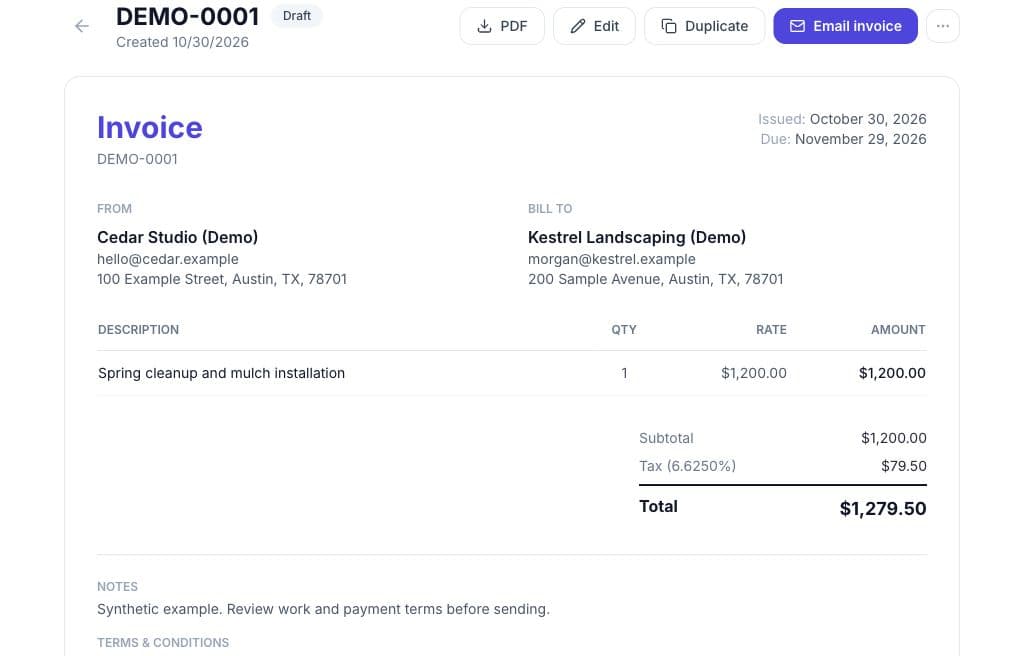
The workflow
How do the features fit together?
Every invoice moves through the same five stages. The badges show where Free stops and Pro starts.
Step 1: Describe the work
Free: 3 drafts · Pro: unlimitedType a sentence, or record one in your browser and have it transcribed. The AI fills in client, line items, quantities, rates, dates and terms. The blank manual editor is always there and does not use a draft.
Step 2: Review and edit
All plansThe draft lands in the normal invoice editor. Nothing is saved or sent until you click save, and only drafts can be edited, so a sent invoice keeps its record.
Step 3: Deliver it
PDF: all plans · Email: ProDownload the PDF on any plan. On Pro, email it with the PDF attached and a link to the client's private portal, and see delivered, opened and bounced events where the email provider reports them.
Step 4: Get paid
Manual: all plans · Links: ProRecord bank transfer, card, cash, check or other payments, including partial ones, on every plan. On Pro, add a Stripe or PayPal link for the remaining balance, recorded when the provider confirms the payment.
Step 5: Follow up
ProSet reminders before and after the due date, and recurring schedules that create the next invoice as a draft, or mark it to be sent, each time the scheduled automation runs.
The review step is deliberate. The AI never sends a one-off invoice on its own, which matters when a misheard rate would otherwise land in a client's inbox.
Plans
Which features are on Free, Pro and Business?
Everything InvoiceQuickly does today, as of October 2026. Prices live on the pricing page, and expenses, projects, reporting, the API and the accounting export are covered further down.
| Feature | Free | Pro | Business | Details |
|---|---|---|---|---|
| AI invoice draft from a typed prompt | 3 in total | Unlimited | Unlimited | Fills the editor; you review and save |
| Voice input | Same quota as AI drafts | Unlimited | Unlimited | Record in the browser, transcribed into a draft |
| Manual invoice editor | 5 invoices in total | Unlimited | Unlimited | Up to 100 line items, notes and terms |
| Clients | 5 | Unlimited | Unlimited | Name, email, phone, company, address, tax ID and notes; the tax ID prints on new documents |
| PDF download | Yes | Yes | Yes | Three PDF styles on paid plans; Free PDFs carry an InvoiceQuickly footer |
| Partial and full payment tracking | Yes | Yes | Yes | Manual record with method, reference and date |
| Duplicate an invoice | Yes | Yes | Yes | Starts a new draft from an old invoice |
| Email delivery with PDF attached | Not included | Yes | Yes | Includes the portal link, and the payment link if added |
| Stripe and PayPal payment links | Not included | Yes | Yes | Your own Stripe or PayPal account; remaining balance only |
| Payment reminders | Not included | Yes | Yes | Before the due date, then repeating overdue reminders |
| Recurring invoices | Not included | Yes | Yes | Weekly, monthly, quarterly or yearly; draft or auto-send |
| Estimates with accept or reject | Not included | Yes | Yes | Client decides in the portal; convert to an invoice |
| Credit notes | Not included | Yes | Yes | Reduce an invoice's balance |
| Private client portal | Not included | Yes | Yes | Per-client link that expires after 90 days |
| Logo, brand colour and footer | Not included | Yes | Yes | Modern, classic or minimal PDF style |
| Invoice CSV export | Not included | Yes | Yes | CSV only, not Excel |
| Expenses | Not included | Yes | Yes | Exact amounts per currency, linked to clients and projects |
| Projects and time tracking with a timer | Not included | Yes | Yes | Timer or manual entries, up to 24 hours each |
| Unbilled time and expenses into a draft invoice | Not included | Yes | Yes | One client and currency per draft; you review it |
| Reports | Dashboard totals | Yes | Yes | Invoices, payments, expenses and time per currency, ranges up to 366 days |
| Public API keys | Not included | Yes | Yes | Scoped keys, 60 requests a minute each; no outbound webhooks |
| AI receipt reading and report insights | Not included | Not included | 200 a month | Premium AI operations; resets on the 1st (UTC); failures not counted |
| QuickBooks Online and Xero export | Not included | Not included | Yes | Selected invoices you review; never sends, charges or copies payments |
| Time imports | Not included | Not included | Yes | Clockify, Toggl Track, Harvest, ClickUp; preview, then import selected entries |
| Team seats with roles | 1 seat | 5 seats | 10 seats | Owner, admin, member, viewer |
Scroll sideways to see every column.
In detail
What does each feature actually do?
Drafting from a prompt
Free: 3 · Pro: unlimited- A good prompt names the client, the work, the amount and the due date. The generator returns structured fields to the editor, not free text in a PDF, and anything missing is yours to fill before saving. A draft counts once, however much you edit it.
Voice input
Same quota- The browser records up to 15 MB of audio, it is transcribed, and the transcript becomes the prompt. Typing is always available.
Line items, discount and tax
All plans- Line items are quantity times unit price, with one discount percentage and one tax percentage per invoice. Tax is calculated on the discounted subtotal and added on top, so tax-inclusive prices and multiple tax lines (GST plus PST, say) are not supported.
Numbering and currencies
All plans- Invoices use a prefix and a 4-digit counter such as INV-0042; estimates use EST- and credit notes CN-, each on its own counter. You can raise the next invoice number but not lower it. Invoice in USD, EUR, GBP, CAD, AUD, INR or PKR, with no currency conversion.
Statuses
All plans- Draft, sent, viewed (when the client opens it in the portal), overdue (set by the Pro reminder job), paid and cancelled. A partial payment lowers the balance, and the invoice flips to paid when the balance reaches zero.
Email delivery and client portal
Pro- Pro emails the invoice with the PDF attached. Each client gets a private portal link to view and download invoices and receipts and to accept or reject estimates. Links expire after 90 days and you can issue a new one at any time. On Free, download the PDF and send it yourself.
Payment links
Pro- InvoiceQuickly does not process payments or hold money. Connect your own Stripe or PayPal account with its API keys, and a link charges the remaining balance on a Stripe Checkout page or a PayPal-hosted invoice. More on accepting invoice payments, Stripe and PayPal.
Reminders and recurring invoices
Pro- Reminders are scheduled before and after the due date, with settings you can change. Recurring schedules repeat weekly, monthly, quarterly or yearly and create drafts unless you switch on auto-send. Both run when InvoiceQuickly's automation runs, and the Recurring page has a button to run it yourself. See recurring invoices.
Estimates and credit notes
Pro- Estimates go to the client's portal to accept or reject, and an accepted estimate converts into an invoice in one step (estimates). Credit notes are issued against an invoice and reduce what is owed.
Client records
Free: 5 · Pro: unlimited- Each client holds name, email, phone, company, address, tax ID and notes, and links to their invoices, estimates and payments. New documents print the client's saved tax ID (client records and portal).
Team roles
Free: 1 · Pro: 5 · Business: 10- Owner, admin, member and viewer. Only owners manage billing, and viewers can only look.
Branding and CSV export
Pro- Add a logo, brand colour and footer, choose a modern, classic or minimal PDF style, and export your invoices as CSV for your bookkeeper.
Worked example
One invoice through every feature
A web designer on Pro bills Northwind Dental $1,850 across three line items, with a 10% loyalty discount and an 8.25% sales tax rate, due in 14 days.
Invoice INV-0042
ExampleNorthwind Dental
Due 14 days from issue
| Item | Amount |
|---|---|
| March website update | $1,200.00 |
| Booking page redesign | $450.00 |
| Hosting setup | $200.00 |
- Subtotal
- $1,850.00
- Discount (10%)
- -$185.00
- Tax (8.25%)
- $137.36
- Total
- $1,802.36
- Paid by bank transfer
- -$900.00
- Balance due
- $902.36
AI draft
The typed prompt fills 3 line items, matches the client and sets the due date. Subtotal $1,850.00.
One discount, one tax rate
10% off is $185.00. Tax at 8.25% is charged on the discounted $1,665.00, which adds $137.36, for a total of $1,802.36.
Manual payment (any plan)
The client pays $900 by bank transfer. The balance drops to $902.36 and the status stays as it was: there is no partially paid status.
Payment link (Pro)
A Stripe link for the remaining balance opens a Checkout page that charges $902.36.
Automatic record
When Stripe confirms the payment, InvoiceQuickly records it and the invoice is marked paid.
Processor fee
At 2.9% + 30¢, Stripe charges you about $26.47. InvoiceQuickly adds no per-invoice fee.
The fee uses Stripe's published standard rate for domestic US cards as of October 2026 (Stripe pricing). International cards and currency conversion cost more.
Beyond the invoice
How does InvoiceQuickly handle expenses, projects, time, reporting and your books?
Pro adds expenses, projects, time tracking, reports and API keys around the invoice, and Business connects your accounting and time-tracking tools. Each linked page shows the workflow in detail.
Expenses
Pro · AI receipts: Business- Record expenses with vendor, category, amount and currency, link them to a client and project, and mark them billable. On Business, AI reads a receipt photo or pasted text into a draft expense you check (expense tracking). Receipt files are not stored.
Projects and time
Pro- Projects with a client, rate and currency; time from a timer or manual entries; and unbilled time and expenses turned into one draft invoice. Up to 5 people on Pro and 10 on Business share the account in four roles (projects and collaboration).
Reporting
Dashboard: all plans · Reports: Pro- Reports on invoices, payments, expenses and time for any range up to 366 days, per currency, with aging, unbilled work and CSV downloads. Business adds AI insights drawn only from those figures (invoice and payment reports).
Accounting export
CSV: Pro · Export: Business- Business exports invoices you select and review, with their clients, to QuickBooks Online or Xero, and never sends invoices, charges clients or copies payments. Pro gives your bookkeeper an invoice CSV (QuickBooks Online and Xero export). There is no Sage connection.
Connections and API
Pro- Stripe and PayPal are the direct payment integrations. Pro and Business can create scoped API keys, and the InvoiceQuickly Zapier app is available by private invite, with triggers for new clients, invoices and payments. There are no outbound webhooks.
Regional formats
All plans- PDFs are English with US number and date formats, and the regional invoicing resources cover country requirements. There is no Peppol, XRechnung, KSeF or other structured format, so use a certified e-invoicing provider where your country requires one.
Limits
What should you know before you sign up?
These smaller limits catch people out, so check them against how you bill. Questions about a specific workflow are welcome through contact.
New invoices, estimates and credit notes print your saved business tax ID and the selected client's tax ID on the PDF. Set those IDs before creating the document; existing documents are not backfilled.
No deposit or retainer step: record a deposit as a payment on the invoice, and the PDF shows the balance due. Lines cannot be negative, so credits use credit notes.
No automatic late-fee lines.
No client CSV import: clients are added by hand.
No native mobile app or offline mode; it runs in the browser.
One business per account.
No two-factor sign-in or SSO. The privacy policy covers how your data is handled.
Fit
Who is this feature set right for, and who should look elsewhere?
A good fit if you
Run a freelance or small service business that sends tens of invoices a month.
Want drafting to be quick, with your review before anything goes out.
Get paid by card, PayPal or bank transfer.
Want AI drafts, reminders and payment links on one $9 plan.
Look elsewhere if you need
Double-entry bookkeeping, bank feeds or tax filing.
Structured e-invoices that a tax authority requires.
Several tax rates on one invoice.
Invoices and payments flowing into QuickBooks or Xero with no review step.
In those cases an accounting suite is the better buy. To weigh tools properly, use our six-step guide to choosing invoice software; invoicing software for small businesses applies it to InvoiceQuickly, and comparisons set it against specific tools.
Keep exploring
Feature pages and resources
Available features
Invoicing software
The core invoicing workflow, InvoiceQuickly's checklist answers and a 12-month cost comparison.
Payments
Stripe and PayPal payment links for the remaining balance, on Pro.
Recurring invoices
Weekly to yearly schedules that create drafts, or send when auto-send is on.
Client records and portal
Client records, the private portal and plan limits.
Quotes and estimates
Quotes your client accepts in the portal, then converts to an invoice.
How it works
Draft, review, send and track, step by step.
Costs, projects, reporting and data
Expense tracking
Record expenses on Pro and bill client costs in a draft invoice.
QuickBooks Online and Xero export
Reviewed invoice export on Business; invoice CSV on Pro.
Invoice and payment reports
Reports on invoices, payments, expenses and time, on Pro.
Projects and collaboration
Projects, time tracking, milestone invoices and team seats.
Integrations
Stripe and PayPal on Pro; QuickBooks Online, Xero and time imports on Business; Zapier by invite.
Regional invoicing resources
Country templates and invoice requirements guides.
Privacy policy
How InvoiceQuickly handles your data.
Plans, templates and guides
Plans and pricing
Free, Pro and Business limits side by side.
Compare invoicing software
Documentation-based comparisons with specific tools.
How to choose invoice software
A six-step evaluation: dealbreakers, scoring and a pilot.
Invoice templates
Over 200 reference layouts by industry, country and document type.
Invoicing resources
Guides on what an invoice should include and how to get paid.
Questions
Frequently asked questions
Can InvoiceQuickly send invoices without me reviewing them?
Not one-off invoices. Every AI draft opens in the editor and nothing is saved or sent until you act. The only sending it does without a click is a recurring schedule where you have switched on auto-send, and Pro reminders for invoices you already sent, both when the scheduled automation runs.
Is there an InvoiceQuickly mobile app?
No. InvoiceQuickly is a web app that you use in a browser, and there is no native iOS or Android app and no offline mode. Voice input records through the browser where the browser allows microphone access.
Which currencies can I invoice in?
The editor offers US dollar, euro, pound sterling, Canadian dollar, Australian dollar, Indian rupee and Pakistani rupee. Each invoice uses one currency and there is no automatic exchange-rate conversion.
Are the free invoice templates the same as the app's PDF styles?
No. The template library has over 200 reference layouts by industry, country and document type that you can download as HTML files. Inside the app, Pro offers three branded PDF styles: modern, classic and minimal.
Where do I start if I only want to try the drafting?
Create a Free account, use one of the 3 AI drafts on a real job, and download the PDF. The invoicing resource hub has guides on what an invoice should include.
Try the drafting on a real job.
Free covers 5 invoices, 5 clients and 3 AI drafts with PDF download. Move to Pro for $9/month for email delivery, payment links, reminders, expenses and time tracking, or Business for $19/month to connect QuickBooks Online, Xero and your time tracker.
Start freeNo card needed for Free.