Recurring invoices on Pro
Recurring invoices: schedule repeat billing and review before it goes out
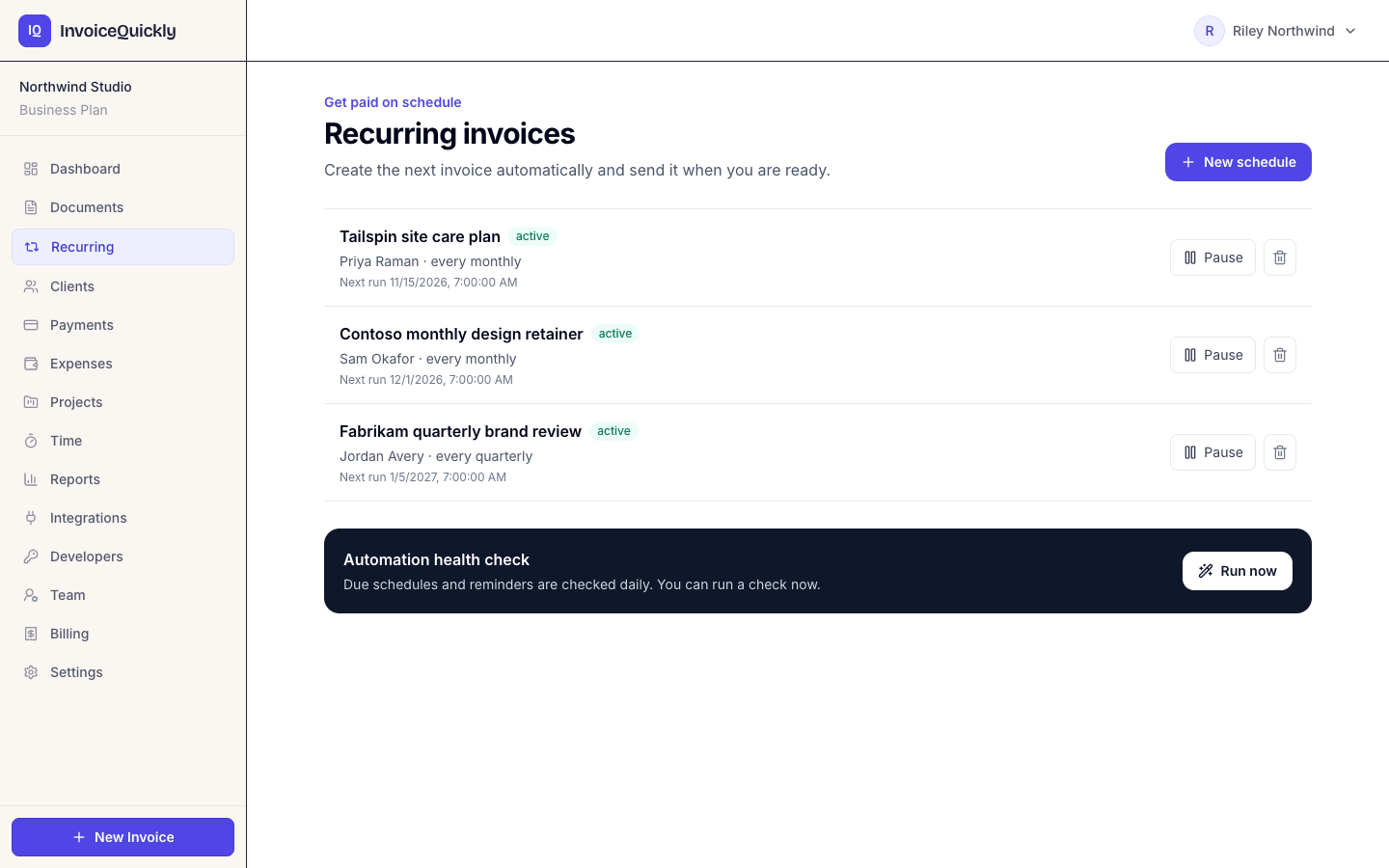
Set up a weekly, monthly, quarterly or yearly schedule for one client and InvoiceQuickly keeps track of the cycle and the numbering. A due schedule creates the next invoice when the scheduled automation runs, or when you press Run now on the Recurring page: a draft for your review by default, or sent when you switch on auto-send.
Recurring schedules are on Pro at $9/month. On Free, duplicate last month's invoice and edit it; try free first with 5 invoices.
Recurring invoices
Pro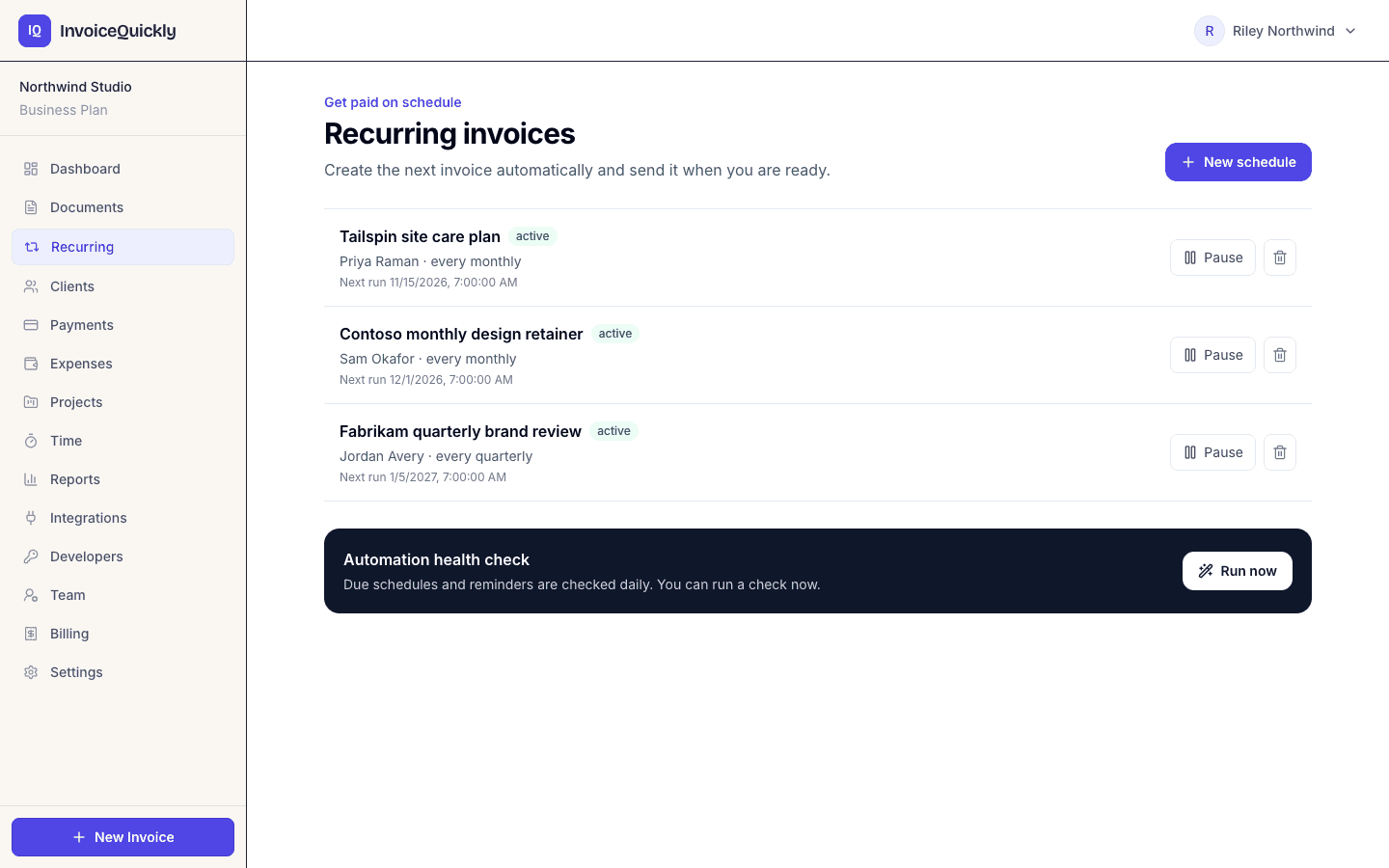
- Drafts for review by default
- Auto-send is a per-schedule setting
- Numbered in your normal invoice sequence
- Pause, resume or archive any schedule
The schedule
What does a recurring schedule contain?
A schedule is a template for the invoice it will create. Choose the billing details on the Recurring page and review the first generated invoice.
| Field | What it controls |
|---|---|
| Schedule name | Your label, for example "Acme retainer" |
| Client | A saved client record; the invoice is addressed to their company or name, email and address |
| Frequency | Weekly, monthly, quarterly or yearly |
| First run | The date and time the first invoice is due to be created |
| Line item | One description, such as "Monthly SEO retainer" |
| Unit price | The fixed amount billed each cycle |
| Currency and due-in days | The invoice currency and payment period; the defaults are your business currency and 30 days |
| Tax and discount | One percentage each, saved with up to four decimal places |
| Notes and terms | Text copied to each generated invoice |
| Email automatically | Off by default; when on, each new invoice is emailed to the client |
Scroll sideways to see every column.
Choose the currency, due-in days, tax and discount rates, notes and terms on the schedule. Each generated invoice uses those saved settings. It gets the next number in your normal invoice sequence (for example INV-0042), so there is no separate numbering to manage.
Limits
What can a schedule hold, and what goes on the draft?
The schedule form is deliberately small. You can edit any generated draft before sending it, which covers most gaps, but only while automatic email is off.
| Setting | How it works |
|---|---|
| One line item and a fixed price per cycle | Add more lines or variable hours on the generated draft. |
| Currency, payment terms, tax, discount, notes and terms | Saved on the schedule and copied to each invoice. |
| Weekly, monthly, quarterly or yearly | Each schedule shows its next run date and whether auto-send is on. |
| Draft or automatic email | Drafts by default; auto-send emails the invoice when the client has an email address. |
| Pause, resume and archive | Pause stops new invoices without losing the schedule, Resume restarts it, Archive retires it. None of them touches invoices already created. |
Scroll sideways to see every column.
| Not on the schedule | What to do instead |
|---|---|
| More than one line item | Add extra lines on the draft, or bill extras on a separate invoice. |
| An every-two-weeks option | Duplicate the previous invoice by hand every second week, on any plan. |
| An end date or a fixed number of cycles | Archive the schedule after the last cycle; set yourself a calendar reminder. |
| Changes after you create it | Archive it and create a new one with the changed details. |
Scroll sideways to see every column.
Runs
How does a schedule turn into an invoice?
A schedule whose run date has passed is processed when InvoiceQuickly's scheduled automation runs. Owners and admins can also process every due schedule at once with the run button on the Recurring page, which also sends any payment reminders due at that moment. InvoiceQuickly does not promise a time of day for a run, so check the Recurring page around each run date, especially the first.
| Setting | What a run produces | What you do |
|---|---|---|
| Email automatically: off (default) | A draft dated the run date, due after the saved number of days | Open it, adjust anything (add hours, tax, a second line), then send |
| Email automatically: on, client has an email | An invoice emailed with the PDF attached and a link to the client portal | Check it in your invoice list after the run date |
| Email automatically: on, client has no email | A draft, as with the default | Add the client's email or send the PDF yourself |
Scroll sideways to see every column.
Recurring invoices behave like any other invoice once they exist. On Pro you can add a Stripe or PayPal payment link, record manual or partial payments, and include them in reminders.
Worked example
A monthly retainer for a year
A marketing consultant bills a client $2,500 per month. They create a monthly schedule with a first run of November 1, 2026, leave automatic email off, and run (or have the automation run) each cycle on its run date.
| Run date (issue date) | Due date (issue + 30 days) | Invoice | Amount |
|---|---|---|---|
| Nov 1, 2026 | Dec 1, 2026 | INV-0042 | $2,500.00 |
| Dec 1, 2026 | Dec 31, 2026 | INV-0043 | $2,500.00 |
| Jan 1, 2027 | Jan 31, 2027 | INV-0044 | $2,500.00 |
| Feb 1, 2027 | Mar 3, 2027 | INV-0045 | $2,500.00 |
| Mar 1, 2027 | Mar 31, 2027 | INV-0046 | $2,500.00 |
Scroll sideways to see every column.
Over twelve months that is 12 invoices and $30,000.00 billed. Invoice numbers assume no other invoices are created in between; one-off invoices use the same invoice counter, so retainer invoices will not always be consecutive. New estimates and credit notes use separate counters.
If the client prefers one payment per quarter, a quarterly schedule at $7,500 produces 4 invoices a year for the same $30,000, with a quarter of the admin and, if they pay by card, a quarter of the fixed per-payment fees.
Lessons
Three things the example shows
Net 30 is not the same day next month
- The February invoice is due March 3, because February 2027 has 28 days. If your contract says "due on the 1st", edit the due date on each draft, or write the due day into the invoice terms.
Keep your chosen billing day
- A new monthly schedule anchored to the 31st uses the last day of a shorter month, then returns to the 31st when it exists. Yearly February 29 schedules use February 28 in non-leap years. Check the next run date when you create the schedule.
Drafts give you a checkpoint
- If the consultant bills extra hours some months, they add a second line to that month's draft before sending. With automatic email on, those extras would need a separate invoice.
Plans
Which plan includes scheduled billing?
| Capability | Free | Pro ($9/month) |
|---|---|---|
| Duplicate last month's invoice and edit it by hand | Yes | Yes |
| Recurring schedules (weekly, monthly, quarterly, yearly) | No | Yes |
| Review each generated invoice as a draft | No | Yes |
| Auto-send setting for generated invoices | No | Yes |
| Payment reminders on overdue invoices | No | Yes |
| Stripe or PayPal payment links on each invoice | No | Yes |
Scroll sideways to see every column.
Free allows 5 invoices in total, so a monthly client would use it up within five months. Duplicating is the manual alternative on any plan: open last month's invoice, choose Duplicate, update the period and send. See the pricing page for plan details and the how it works page for the draft, review and send flow.
Alternatives
Schedule, duplicate or subscription: which fits your billing?
A recurring schedule fits billing that is the same, or nearly the same, every cycle.
| Approach | Best for | Main tradeoff |
|---|---|---|
| InvoiceQuickly recurring schedule | Fixed retainers, maintenance plans, annual contracts billed to a business that pays invoices | The client still has to pay each invoice; one line item per schedule |
| Duplicate and edit each cycle | Work that changes a lot month to month, or when you are on Free | You have to remember each cycle |
| Card-on-file subscription billing | Consumer or SaaS subscriptions where the card is charged automatically | Needs a billing system; Stripe Billing, for example, charges 0.7% of billing volume on its pay-as-you-go plan (Stripe Billing pricing, accessed 2026-10-27) on top of payment processing |
Scroll sideways to see every column.
Fit
When is recurring invoicing the wrong tool?
A good fit when
You bill the same fixed amount to the same client every week, month, quarter or year.
Your client pays invoices rather than a saved card.
You want each cycle's invoice waiting as a draft you can check and adjust.
Use something else when
You need the client's card charged automatically. InvoiceQuickly sends invoices; it does not store cards or collect payment on its own. Use a subscription billing system.
The amount depends on hours or usage. A schedule bills one fixed line, and there is no usage metering. For hours, track time on Pro and bill it from the Unbilled page; otherwise keep automatic email off and edit each draft.
You are splitting one fixed total into installments. Schedules have no end date or cycle count, so a six-payment plan keeps going after payment six unless you archive it.
You need mixed tax rates or authority-specific invoice formats. A schedule supports one tax percentage across its one line; it does not add per-line taxes or structured regional e-invoices.
You need exact send times. Runs are processed when the automation runs, and InvoiceQuickly does not promise a time of day.
You need a deposit up front or a retainer balance drawn down over time. Neither is tracked. The retainer agreements guide shows how to structure them with separate invoices.
If you need one of these, tell us through the contact page. For cycles, proration and billing dates, read the recurring billing guide, or use the free recurring invoice template if you bill outside the app.
Questions
Frequently asked questions
Do recurring invoices send automatically?
Only on schedules where you switch on "Email each generated invoice automatically" and the client has an email address, and only when a run happens: when the scheduled automation runs, or when an owner or admin presses the run button on the Recurring page. By default, each run creates a draft for you to review and send. InvoiceQuickly does not promise a specific time of day for a run.
Can I change a recurring invoice before it goes out?
Yes, if automatic email is off. Each run creates a draft, and drafts are fully editable: add lines, set a tax or discount rate, change the due date or notes, then send. Once an invoice is sent it can no longer be edited.
Can I bill every two weeks?
Not from the schedule form. It offers weekly, monthly, quarterly and yearly. For a two-week cycle, duplicate the previous invoice by hand every second week, which works on any plan.
What happens to the schedule if I delete the client?
Deleting a client also removes that client's recurring schedules, and new invoices stop. Invoices already created stay in your invoice list. Pause or archive the schedule first if you only want to stop billing.
Is there a limit on recurring schedules?
Pro has no stated cap on schedules or on the invoices they create; invoices and clients are unlimited on Pro. Free does not include recurring schedules.
Can recurring invoices include a payment link?
Yes, on Pro. Once a generated invoice is sent, create a Stripe or PayPal link for it from the invoice menu, and your client sees a Pay button in their portal. Payment links are created per invoice, not stored on the schedule.
Set up your first retainer schedule.
Pro at $9/month adds recurring schedules, reminders and payment links. Every generated invoice can wait as a draft until you've checked it.
Start with ProOr try free first and duplicate invoices by hand. 5 invoices, no card.