Invoice and payment reporting
Invoice and payment reports for small businesses
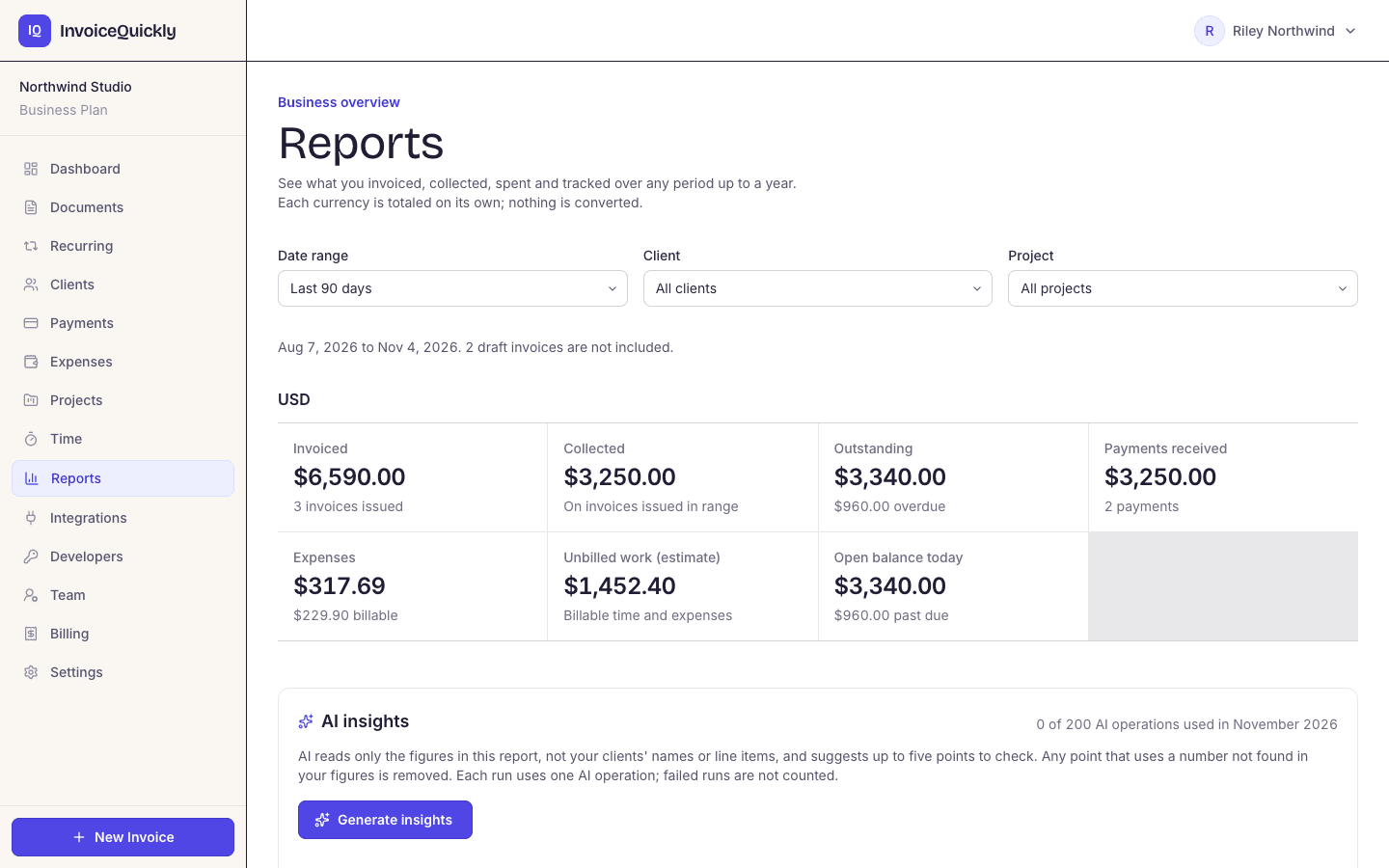
On Pro ($9/month), the Reports page shows what you invoiced, collected, spent and tracked for any date range up to 366 days, filtered by client or project, with every amount kept per currency. It includes a receivables aging snapshot by due date, a list of unbilled work and a CSV download for each table. On Business ($19/month), AI adds 3 to 5 written observations drawn only from those figures. On every plan, the dashboard shows all-time totals for collected, outstanding, invoices and clients.
Reports are on Pro ($9/month) and Business ($19/month); AI insights need Business. The dashboard, Payments page and Documents list are on every plan, so you can try free first.
Reports: last 90 days
Pro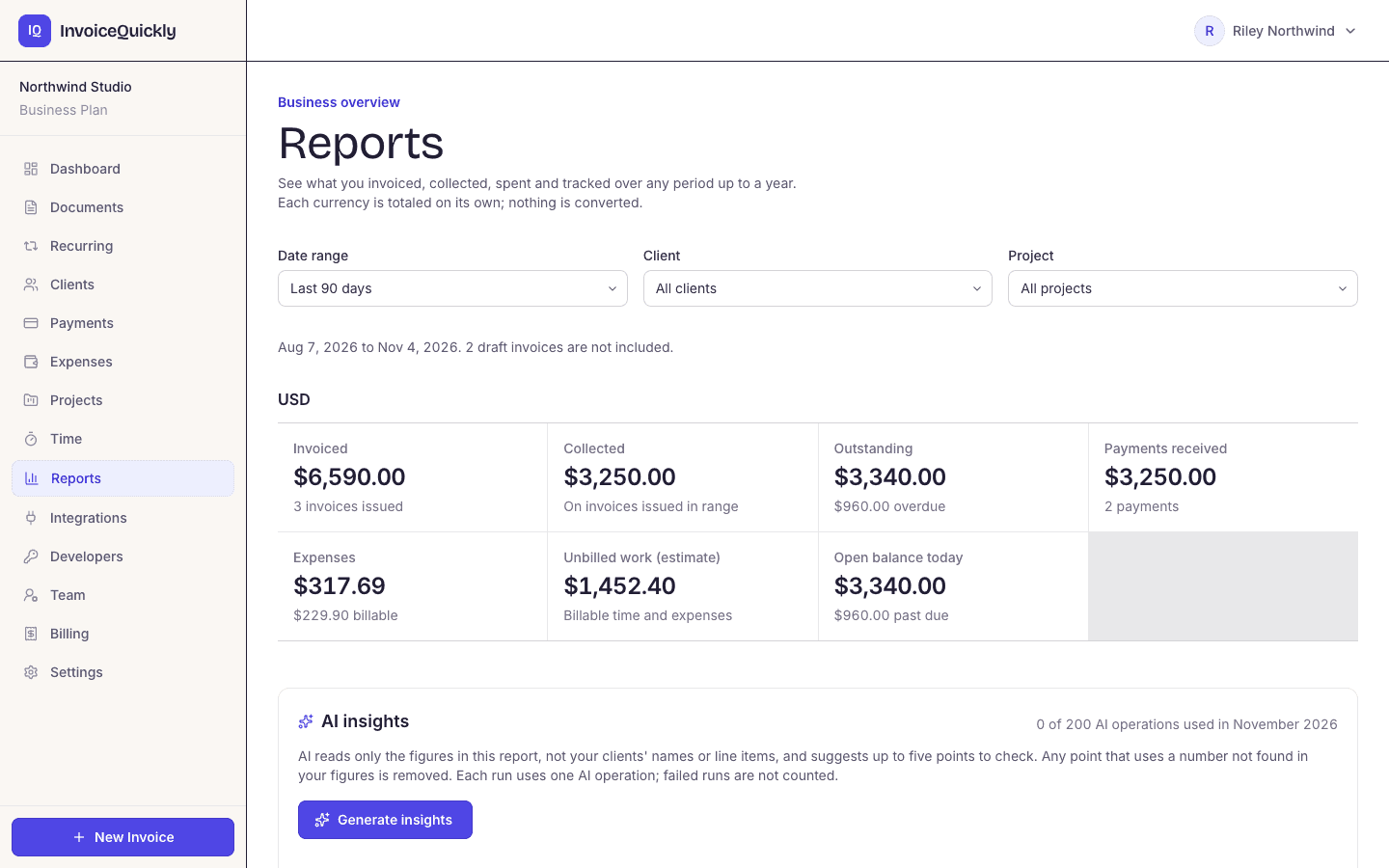
- Pro: any date range up to 366 days
- Invoices, payments, expenses and time, per currency
- Aging by due date, plus unbilled work
- Business: AI insights from your own figures
Reporting
What reporting does InvoiceQuickly include?
Pro and Business add a Reports page; every plan has the dashboard, Payments page and Documents list. Together they answer "who owes me money?", "how much has come in?" and "what haven't I billed yet?" directly.
Reports page
Pro- Invoices issued, invoiced, collected, credited, outstanding and overdue; payments received, refunded and net by method; expenses by category; and hours tracked, billable, billed and unbilled. Pick a preset such as last month or year to date, or any range up to 366 days, and filter by client or project. Drafts are left out of the totals.
Aging and unbilled work
Pro- Open invoice balances in Current, 1-30, 31-60, 61-90 and 90+ day buckets by due date, as of today, plus the time and expenses you haven't billed yet. Each of these tables downloads as CSV.
Time valued like your invoices
Pro- Billable time is valued at each entry's hourly rate, the same way the Time page and invoices value it. Billable hours with no rate are shown separately instead of being guessed.
AI insights
Business- AI writes 3 to 5 short observations from the report's recalculated figures. An observation that cites a number not in those figures is dropped, and each run uses one of 200 premium AI operations a month.
Dashboard totals
All plans- Total collected, total outstanding, the number of invoices and the number of clients, plus your five most recent documents with their status.
Payments list
All plans- Every payment recorded against an invoice, by Stripe, PayPal or manual entry, with the invoice, client, method, date and amount after any refund. A Total Received figure sits on top, per currency.
Documents list with status
All plans- Every invoice, estimate and credit note with its client, status (draft, sent, viewed, overdue, paid or cancelled), issue date and total. Tabs filter by document type.
CSV export
Pro- One click on the Documents page downloads every document as a CSV file, ready for a spreadsheet, the aging report below or your accountant.
Reports cover invoices, payments, expenses and time. There is no profit and loss, balance sheet, cash flow or tax report, and currencies are never converted into one total. Those statements need a full ledger and bank balances; the accounting basics hub explains why, and the QuickBooks Online and Xero export gets your invoices into one.
CSV export
What's in the CSV export?
On Pro, the Documents page has a CSV button once you have at least one document. Anyone in your workspace can use it, whatever their role. The file, named invoices-YYYY-MM-DD.csv, holds every document you've created, newest first, with these 13 columns.
| Column | What it holds |
|---|---|
| Invoice Number | INV-, EST- or CN- number, so estimates and credit notes are in the file too |
| Status | draft, sent, viewed, overdue, paid or cancelled for invoices |
| Client | Client name, or the name typed on the invoice |
| Client Email | Client email, if there is one |
| Issue Date | YYYY-MM-DD |
| Due Date | YYYY-MM-DD |
| Currency | Three-letter code, for example USD |
| Subtotal | Before discount and tax |
| Tax | Tax amount |
| Discount | Discount amount |
| Total | Invoice total |
| Paid At | Date the invoice became fully paid, if it has |
| Payment Link | The Stripe or PayPal link, if one was created |
Scroll sideways to see every column.
What the file doesn't hold. There is no amount-paid or balance column, so for a partly paid invoice, take the payments from the Payments page. The export always covers all documents; filter by date in your spreadsheet.
For tax time, the Tax and Issue Date columns give your accountant the tax charged on each invoice. The return itself is up to you or your accountant.
The dashboard
What does each dashboard figure count?
On every plan, the dashboard shows four all-time tiles above your five most recent documents, and the Payments page adds a Total Received figure, net of refunds. For a date range, use the Reports page on Pro.
| Dashboard figure | What it counts | Limits |
|---|---|---|
| Total revenue | All payments recorded against invoices, full or partial, after refunds | All-time only. Cash received, not revenue earned. |
| Outstanding | Unpaid balance of invoices that are sent, viewed or overdue, after payments and credit notes | All-time; drafts and cancelled invoices excluded |
| Total invoices | Count of invoices (not estimates or credit notes) | No breakdown by month |
| Clients | Count of clients |
Scroll sideways to see every column.
Each currency is totalled separately. If you bill in USD and EUR, the tile shows both, rounded to whole units, for example "$7,450 / €1,200". Nothing converts them.
"Total revenue" is cash. It adds up payments received, so an invoice issued in March and paid in May counts in May. For tax, that matches the cash method, not the accrual method; the accounting basics hub explains the difference.
Worked example
How do you build an AR aging report from your invoices?
An aging report groups unpaid balances by how far past their due date they are on a chosen date: Current (not yet due), 1-30, 31-60, 61-90 and over 90 days past due. Some systems age from the invoice date instead; aging from the due date shows lateness, which is what you'll act on. On Pro, the Reports page builds this table as of today. Example: six unpaid USD invoices as of 31 October 2026. INV-0024 was $2,400.00 with $1,000.00 already paid, so its balance is $1,400.00.
| Invoice | Client | Due date | Balance | Days past due | Bucket |
|---|---|---|---|---|---|
| INV-0031 | Acme Ltd | 2026-11-14 | 1,200.00 | not yet due | Current |
| INV-0029 | Bluebird Co | 2026-10-30 | 400.00 | 1 | 1-30 |
| INV-0027 | Bluebird Co | 2026-10-20 | 850.00 | 11 | 1-30 |
| INV-0024 | Cobalt LLC | 2026-09-25 | 1,400.00 | 36 | 31-60 |
| INV-0019 | Acme Ltd | 2026-08-28 | 600.00 | 64 | 61-90 |
| INV-0012 | Delta Inc | 2026-07-15 | 3,000.00 | 108 | Over 90 |
Scroll sideways to see every column.
| Bucket | Balance | Share of total |
|---|---|---|
| Current | 1,200.00 | 16.1% |
| 1-30 | 1,250.00 | 16.8% |
| 31-60 | 1,400.00 | 18.8% |
| 61-90 | 600.00 | 8.1% |
| Over 90 | 3,000.00 | 40.3% |
| Total | 7,450.00 | 100% |
Scroll sideways to see every column.
In a spreadsheet
Reproduce the aging report in six steps
Useful when you need an as-of date other than today, or you're on a plan without Reports and working from the CSV.
Step 1: Set the as-of date
Put it in a spare cell, say K1, for example 2026-10-31.
Step 2: Paste and filter the CSV rows
Export: ProKeep rows starting with your invoice prefix (INV- by default). Remove EST- and CN- rows, and rows with status draft, cancelled or paid.
Step 3: Add a Balance column
For most rows it equals Total. For partly paid invoices, subtract the payments you recorded, because the export has no amount-paid column.
Step 4: Add a Days column
=$K$1-F2, where F2 is the Due Date.
Step 5: Add a Bucket column
=IF(G2<=0,"Current",IF(G2<=30,"1-30",IF(G2<=60,"31-60",IF(G2<=90,"61-90","Over 90"))))
Step 6: Total by bucket
Total the Balance column by Bucket with a pivot table or SUMIF.
Check your work against the dashboard. Aged as of today, your total should equal the dashboard's Outstanding figure for that currency, because both are the unpaid balance of sent, viewed and overdue invoices; in this example both would read $7,450 (the dashboard rounds to whole units). If they don't match, you've usually missed a partial payment or left a cancelled invoice in. Don't age by status: an invoice only becomes "overdue" when a Pro overdue reminder is sent for it, so an unpaid invoice past its due date can still say "sent". The due date is the reliable field.
Acting on it
What does the aging report tell you to do?
Read it by client, not just by bucket. There is no universal "good" aging percentage: compare the report with your own payment terms and watch the trend. If the share over 60 days grows from one month to the next, your collection process is slipping.
Delta Inc: call
- 40.3% of what you're owed is one invoice, 108 days late. That is a phone call, not another email.
Acme Ltd: ask about the old one
- One current invoice and one 64 days late. Ask about the old one before the new one comes due.
Bluebird Co: a reminder
- Two invoices only days late, so a reminder is enough.
On Pro, you can set scheduled reminders before and after the due date. They run when InvoiceQuickly's scheduled automation runs, or from the run button on the Recurring page. For one-off messages, the free payment reminder templates give you a gentle, a firm and a final wording, and the late fee calculator works out simple interest on an overdue balance. To track how fast clients pay over time, the getting paid hub shows how to work out days sales outstanding from these figures, and the accounts receivable turnover entry covers the related ratio.
Fit
When InvoiceQuickly's reporting isn't enough
A good fit when
You want to know who owes you money, what has come in and what you haven't billed yet.
Per-currency reports on invoices, payments, expenses and time are enough, and your accountant prepares the statements.
Look elsewhere when
You need a profit and loss statement. Reports show what you invoiced, collected and spent, but there is no ledger, depreciation or accrual adjustment; use accounting software.
You need a month-by-month chart. Reports total one date range at a time, so compare months by running each range.
You bill in several currencies and want one total. InvoiceQuickly keeps currencies apart and doesn't convert.
You're on the Free plan and need date ranges or a spreadsheet. Reports and the CSV export are on Pro ($9 a month). On Free, the dashboard shows all-time totals only.
Lenders or investors want statements. They'll expect statements prepared from full books, usually by an accountant.
If a report you need is missing, tell us what you'd need.
Questions
Frequently asked questions
What reports does InvoiceQuickly have?
On Pro and Business, a Reports page covers invoices, payments, expenses and time for any date range up to 366 days, filtered by client or project, with every amount per currency, an aging snapshot by due date and a list of unbilled work. Each table downloads as CSV, and Business adds AI insights. Every plan has the dashboard's all-time totals and the Payments page. There are no financial statements or tax reports.
How do you calculate the age of a receivable?
Subtract the invoice's due date from the date you're reporting on. A result of zero or less is current; otherwise it goes in the 1-30, 31-60, 61-90 or over-90-day bucket. Use the unpaid balance, not the original total, for partly paid invoices.
Does InvoiceQuickly show revenue by month?
Yes, on Pro: choose this month, last month or any range up to 366 days on the Reports page to see what you invoiced and collected in it, per currency. There is no month-by-month chart, so run one range per month or pivot the CSV export by Issue Date. On Free, the dashboard totals are all-time.
Does InvoiceQuickly produce a profit and loss statement?
No. Reports show what you invoiced, collected and spent, per currency, but there is no ledger, bank balances, depreciation or accrual adjustment, so there is no profit and loss, balance sheet or cash flow statement. Keep those in accounting software or with your accountant; on Business, reviewed invoices can be exported to QuickBooks Online or Xero.
Know who owes you, and what you haven't billed.
Pro at $9/month adds Reports, AR aging and the CSV export; Business at $19/month adds AI insights. The dashboard and payment tracking work on every plan.
Start with ProOr try free first: 5 invoices, no card.