Invoicing for small businesses
Invoicing software that starts with a sentence
Describe the work and review an editable invoice draft. Email it with a Stripe or PayPal payment link on Pro, then track the balance and follow up from the same place. Business adds reviewed invoice export to QuickBooks Online and Xero.
Free: 5 invoices, 5 clients and 3 AI drafts, no card. Pro: $9/month. Business: $19/month.
New invoice
ExampleInvoice Harbor Fitness $1,200 for April social media management and $150 for ad spend, due in 15 days.
Draft fills the editor for your review
- Client
- Harbor Fitness
- Line 1
- April social media management · $1,200.00
- Line 2
- Ad spend · $150.00
- Due
- 15 days from issue
- Total
- $1,350.00
- Free to start, $9/month for Pro
- No per-invoice or per-payment fee
- Clients pay into your own Stripe or PayPal
- One-off invoices wait for your review
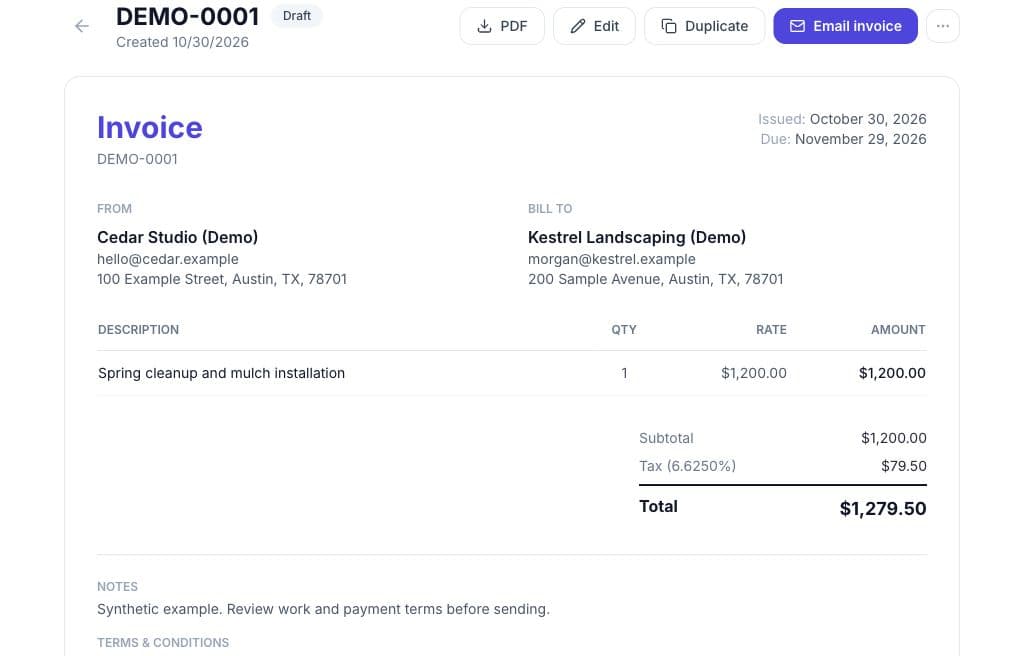
Your invoice workflow
Draft, send and follow up in one place
Start from the work
All plans- Type the client, job, amount and due date. Check the editable draft before you save it, or use the manual editor.
Send with a way to pay
Pro- Email the PDF with a Stripe or PayPal link. Clients pay into your own account, and the confirmed payment is recorded against the invoice.
Keep track of the balance
All plans · Reminders on Pro- Record full or partial payments and see what remains due. On Pro, schedule reminders and use project time and expenses to prepare the next draft.
The PDF
What does the invoice PDF your client receives look like?
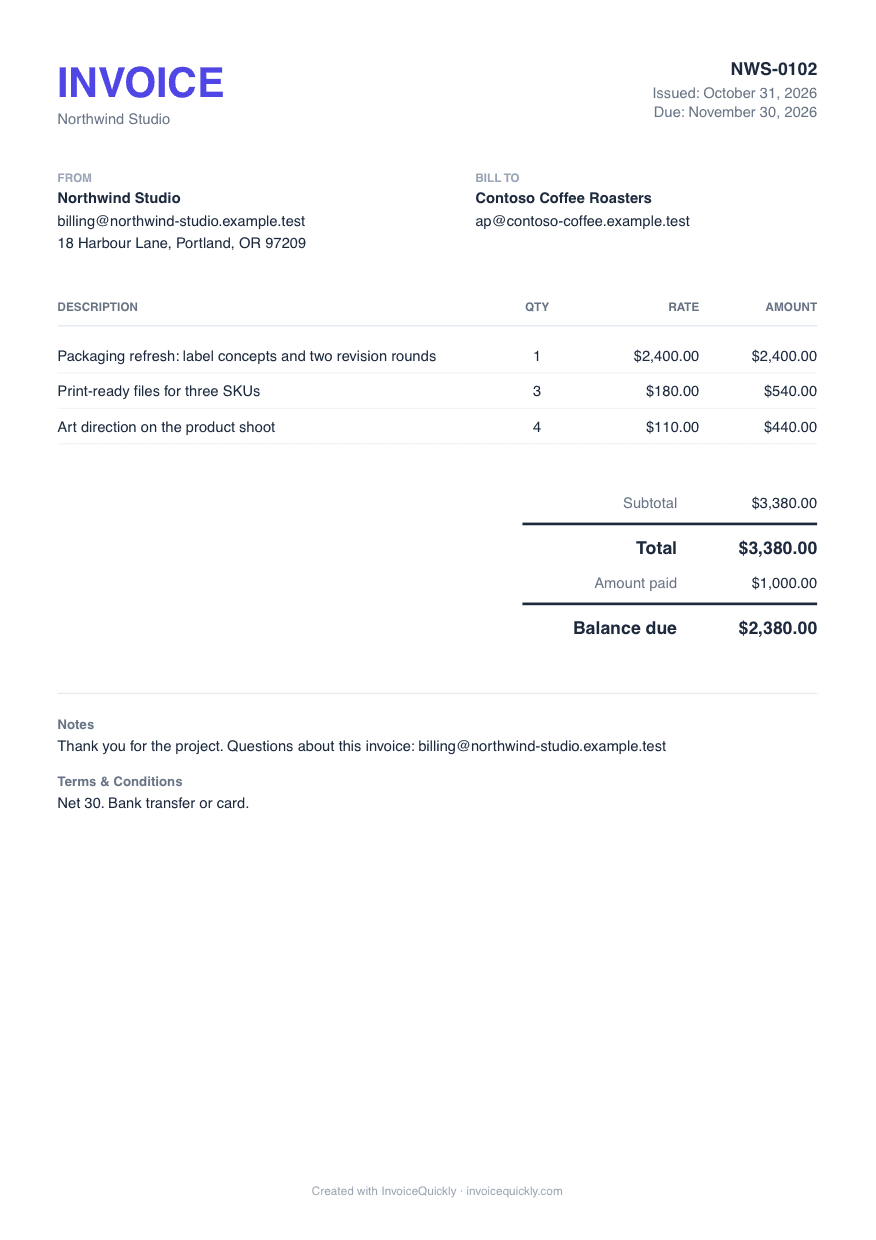
Every invoice downloads and emails as a PDF generated from the invoice record. This one is part-paid, so it shows what was paid and what is still due.
Invoice PDF: NWS-0102
Total, payments and balance
The PDF shows the total, any payments you recorded, any credit notes applied and the balance still due, so a part-paid invoice can't be misread.
Both parties' details
Your business name, email and address sit beside the client's. New documents also print the tax IDs saved on your business and on the client.
Notes and terms
Payment instructions, notes and terms print under the totals, so the client knows how and when to pay.
Checklist
How does InvoiceQuickly answer a buyer's checklist?
Our guide to choosing invoice software has the full method: audit your last 90 days of invoices, set dealbreakers, weight and score each tool, then pilot it. This table gives InvoiceQuickly's answers to the questions that guide asks, as of November 2026. The features page lists everything by plan.
| Criterion | InvoiceQuickly today |
|---|---|
| Time to create an invoice | Type or say one sentence, then review the AI draft |
| Free-plan limits | 5 invoices and 5 clients for the life of the account, plus 3 AI drafts |
| Online payment | Pro: your own Stripe or PayPal account, with no added InvoiceQuickly fee |
| Payment reminders | Pro: before the due date plus repeating overdue reminders |
| Recurring invoices | Pro: each run creates a draft for review, or sends when auto-send is on |
| Estimates | Pro: clients accept or reject in the client portal |
| Tax handling | One rate per invoice, added on top. Saved business and client tax IDs print on new documents |
| Bookkeeping and bank feeds | Not offered. CSV export on Pro; reviewed QuickBooks Online and Xero export on Business |
| Team access | Free 1 seat, Pro 5, Business 10, with four roles |
| Time and expenses | Pro: timer, expenses and one reviewed draft invoice from them |
| Regional rules | English PDF only; no mandated e-invoice formats |
| Getting your data out | PDFs on every plan; invoice CSV on Pro |
Scroll sideways to see every column.
Two criteria rule out most tools quickly. Tax: if you need several rates on one invoice or tax-inclusive prices, check that before anything else. Bookkeeping: if your accountant expects you to reconcile bank transactions in the same tool, an invoicing-only product will not do it.
Invoicing or accounting
Do you need invoicing software or an accounting suite?
Buy for the work that hurts. QuickBooks Online lists at $38/month for Simple Start (1 user), $85 for Essentials (3 users) and $140 for Plus (5 users), with bookkeeping included (QuickBooks pricing, October 2026). The invoicing plans in the cost table below run from $0 to $43/month for one user.
Invoicing software is enough when
Creating invoices, sending them and getting paid is the work that takes your time.
A bookkeeper can work from a monthly export you hand over.
You do not reconcile bank accounts or file sales tax from the same tool.
Buy an accounting suite when you must
Produce a profit and loss statement.
Reconcile bank accounts or keep double-entry books.
File sales tax from your books.
Keep invoicing inside QuickBooks or Xero because your accountant already does your books there.
A common setup is to invoice in one tool and hand a monthly export to a bookkeeper. InvoiceQuickly Business ($19/month) exports invoices you review to QuickBooks Online or Xero, without payments, and Pro hands over a CSV. The accounting scope page explains what is and is not available.
Cost
What does invoicing software cost over 12 months?
Worked example: a consultant with 15 active clients sends 12 invoices a month, wants automatic reminders and card payments, and works alone. Prices are each vendor's published list price as of October 2026, before introductory discounts and sales tax.
| Tool and plan | Monthly list price | 12-month cost | What decides the plan here |
|---|---|---|---|
| Zoho Invoice | $0 | $0 | Free plan allows 500 invoices a year and 2 users |
| Wave Starter | $0 | $0 | Unlimited invoices; automated reminders need Pro |
| InvoiceQuickly Pro | $9 | $108 | Free stops at 5 invoices; reminders and payment links are Pro |
| Wave Pro | $19 (or $190/year) | $190 to $228 | Adds automated late-payment reminders |
| QuickBooks Online Simple Start | $38 | $456 | Accounting suite, 1 user |
| FreshBooks Plus | $43 | $516 | Lite ($23) caps billable clients at 5; Plus allows 50 |
Scroll sideways to see every column.
Sources: Zoho Invoice pricing, Wave pricing, QuickBooks pricing, FreshBooks pricing, all accessed October 27, 2026. FreshBooks and QuickBooks were advertising temporary first-months discounts that this table leaves out, because the list price is what you pay from then on.
| Processor and rate (October 2026) | Fee per $500 invoice | 144 invoices a year |
|---|---|---|
| Stripe, 2.9% + 30¢ | $14.80 | $2,131.20 |
| Wave Payments on Starter, 2.9% + 60¢ | $15.10 | $2,174.40 |
| PayPal Invoicing, card 2.99% + 49¢ | $15.44 | $2,223.36 |
Scroll sideways to see every column.
Sources: Stripe pricing, Wave pricing, PayPal business fees (page dated October 1, 2026). Wave Pro waives the 60¢ fixed fee on the first 10 card payments each month.
Processing costs more than the software. On $72,000 a year of card payments, fees come to about 20 times a $9 subscription, and the gap between processors is under $100. Choose on workflow and limits first, then ask clients to pay by bank transfer where they are willing, which you can record manually in any of these tools.
Fit
Where does InvoiceQuickly fit, and who should choose something else?
InvoiceQuickly suits a freelancer or small service business that bills from memory at the end of a job. The how it works page shows each step.
InvoiceQuickly suits you if
You want each invoice drafted from a sentence, then checked by you before it is saved or sent.
You want email delivery, Stripe or PayPal links, reminders and recurring invoices on one $9 plan.
Up to 5 people need access on Pro, or 10 on Business, with four roles.
You want to try it on real work first: 5 invoices, 5 clients and 3 AI drafts free, no card.
Choose something else if
Price is the only criterion. Zoho Invoice's free plan (500 invoices a year) and Wave Starter (unlimited invoices) cost nothing; InvoiceQuickly Free is a trial-sized 5 invoices in total.
You need bookkeeping. InvoiceQuickly has expenses and reports on Pro, but no ledger, bank feeds or financial statements.
Your invoices need several tax rates or tax-inclusive prices. InvoiceQuickly supports one tax percentage per invoice, added on top. Saved business and client tax IDs do print on new documents.
E-invoicing is mandatory where you operate. InvoiceQuickly produces PDFs only. See regional invoicing resources.
You want a native mobile app or offline use. It is web only.
Trial
How do you test invoicing software before committing?
A one-hour trial on a real invoice tells you more than any feature list. The badges show what each step needs in InvoiceQuickly.
Step 1: Bill a real job
All plansRecreate last month's largest invoice and time it.
Step 2: Read the PDF as your client would
All plansCheck names, addresses, tax line, payment terms and anything your jurisdiction requires.
Step 3: Send it to yourself
ProCheck the email subject, the attachment and how the payment link looks on a phone.
Step 4: Pay a small test amount
ProConfirm the invoice updates and the money arrives in your own account.
Step 5: Look at the follow-up settings
ProFind the reminder schedule and decide whether the defaults suit your clients.
Step 6: Export your data
PDF: all plans · CSV: ProMake sure you can leave with your invoice history.
Plan details are on the pricing page.
Keep exploring
Compare tools and see what Pro includes
Compare and decide
Compare invoicing software
Side-by-side pages for specific tools, based on each vendor's public documentation.
Plans and pricing
Free, Pro and Business limits side by side.
Every feature by plan
What works today, on which plan, and what does not.
Draft, review, send and track
The InvoiceQuickly workflow, step by step.
Ask a question
Ask the InvoiceQuickly team before you choose.
Pro features
Accept invoice payments
Stripe and PayPal links for the remaining balance.
Recurring invoices
Schedules that create drafts, or send when auto-send is on.
Client records and portal
Client records, the private portal and plan limits.
Estimates and quotes
Send an estimate, get it accepted, convert it to an invoice.
Expense tracking
Log costs and bill them back on the next invoice.
Projects and time
Track time per project and draft one invoice from it.
Invoice and payment reports
What is owed, what was paid and what is still unbilled.
Questions
Frequently asked questions
What is the best invoicing software for a small business?
The best one is the cheapest tool that covers your must-haves. Settle tax handling first (several rates or structured tax reporting), then decide whether you need bookkeeping, then compare payment options and reminders. A service business that only needs to bill and get paid rarely needs a $38 to $85 accounting plan.
Is there free invoicing software for small businesses?
Yes. Several tools have permanent free plans with different limits, and InvoiceQuickly's Free plan covers 5 invoices, 5 clients and 3 AI drafts with no card and no time limit. Check whether a free limit is counted per month, per year or over the life of the account, and whether reminders and online payment are included.
Does InvoiceQuickly charge transaction fees?
No. InvoiceQuickly adds no per-invoice or per-payment fee. When a client pays through your connected Stripe or PayPal account, that provider charges its standard processing fee to you directly.
Can a small business use invoicing software and an accountant at the same time?
Yes. Send invoices from the invoicing tool, then give your bookkeeper an export each month. With InvoiceQuickly Pro that export is a CSV of your invoices; on Business, you can export invoices you review straight to QuickBooks Online or Xero instead.
How long does it take to switch invoicing software?
Plan for an afternoon: add your clients, recreate any recurring schedules, set your invoice number to continue from your old tool, and keep the old account until outstanding invoices are paid. InvoiceQuickly has no client import, so clients are added by hand.
Test it on last month's largest invoice.
Recreate one real job on the Free plan and download the PDF. Move to Pro for $9/month only if it earns its place.
Start free5 invoices, 5 clients and 3 AI drafts. No card.