Track expenses and bill client costs on your invoices
On Pro ($9/month), record each expense with its date, vendor, category, amount and currency, link it to a client and project, and mark it billable. When you bill, select unbilled expenses and tracked time and InvoiceQuickly builds one draft invoice at cost, so you add any markup and review it before it goes out. On Business ($19/month), AI also reads a receipt photo or pasted receipt text into a draft expense you check before saving. On Free, type each cost as a line item yourself.
Expenses are on Pro ($9/month) and Business ($19/month). Typing costs as line items works on every plan, so you can try free first with 5 invoices.
Expenses
Pro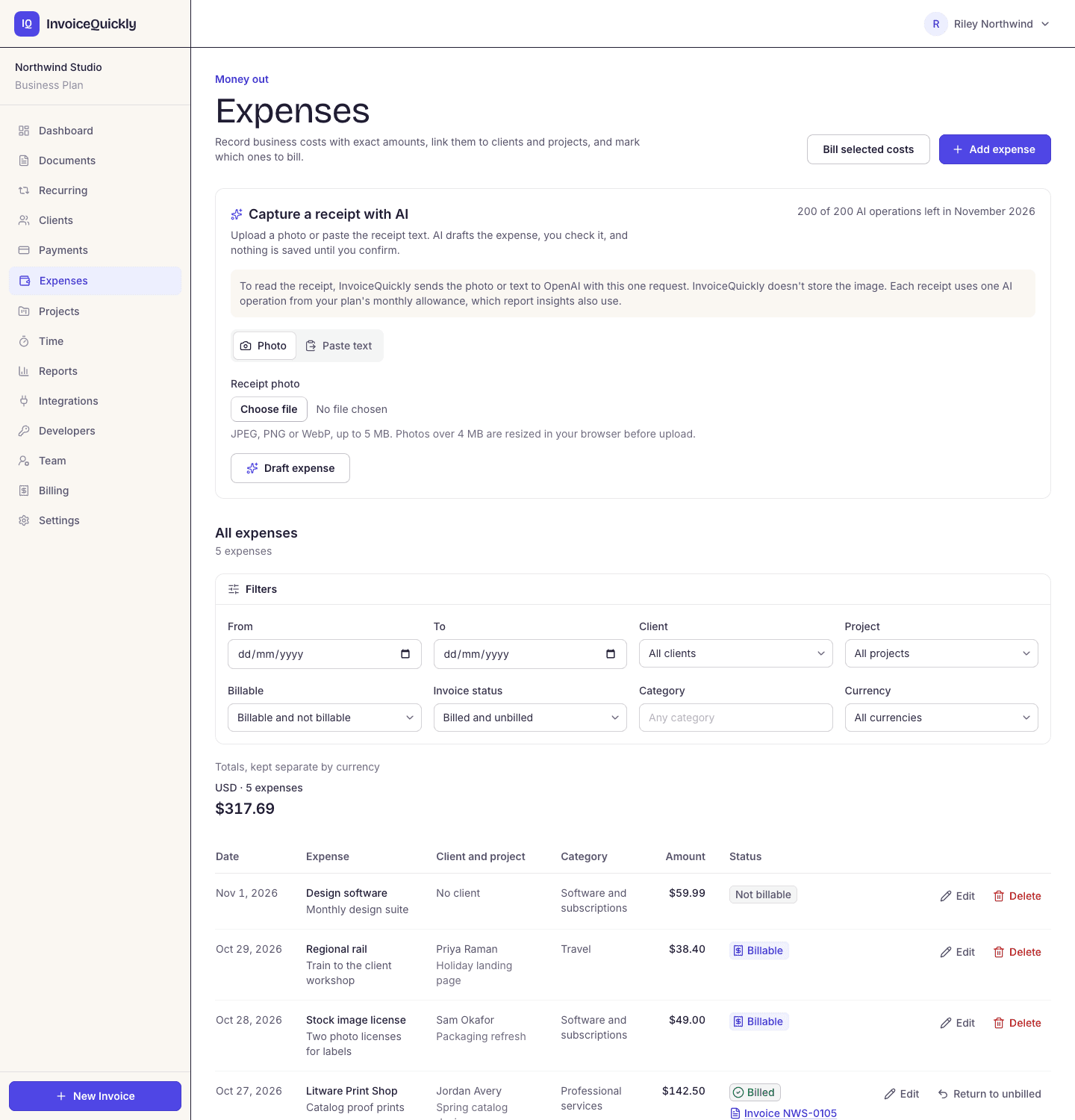
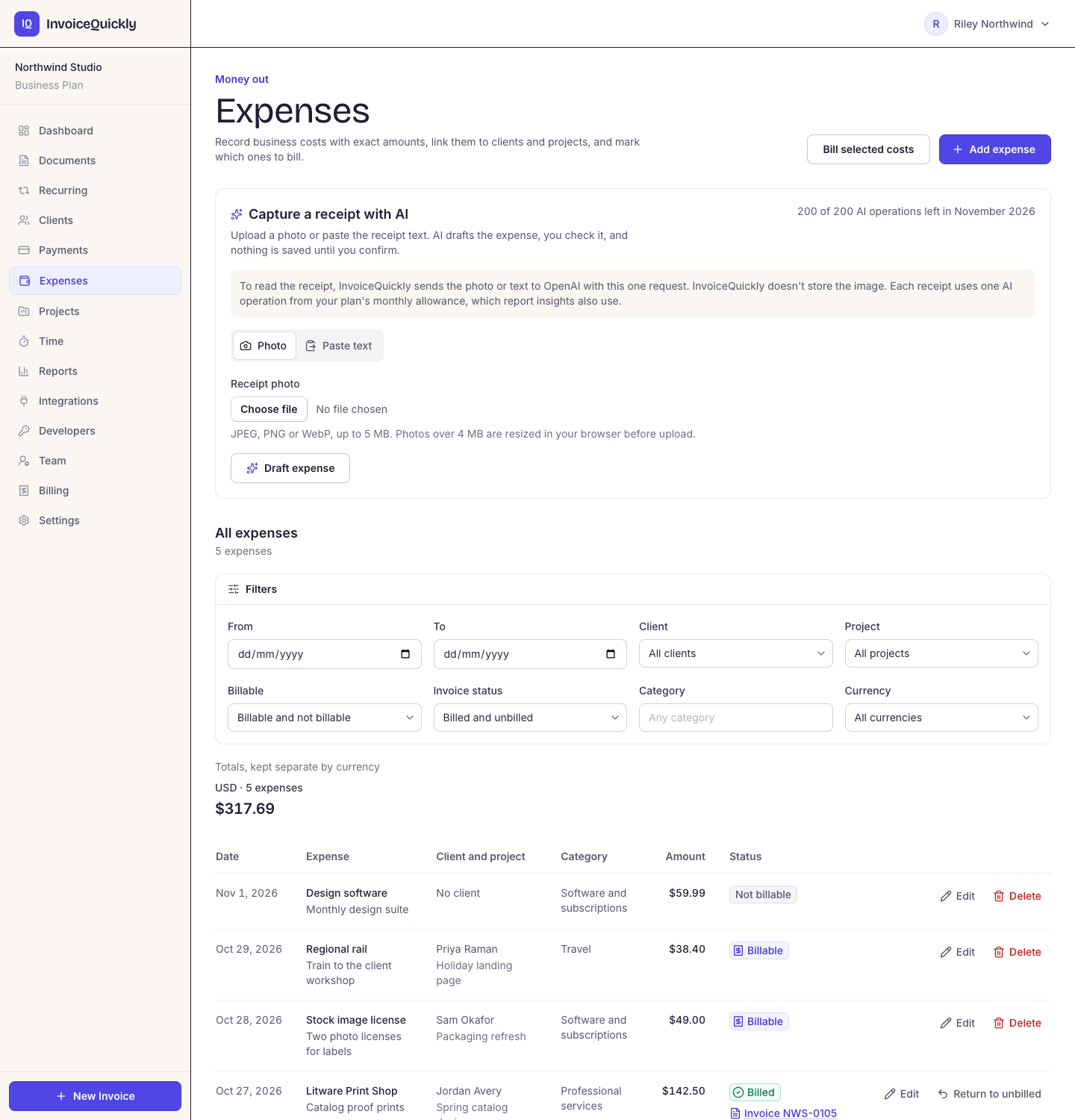
- Pro: expenses with client, project and billable flag
- Billable costs go into one draft you review
- Business: AI receipt reading, 200 a month
- Totals per currency, never converted
What you can do
What does InvoiceQuickly do with your expenses?
Pro and Business record expenses and bill them; Free bills costs you type as line items. Receipt files, bank feeds and mileage stay in your own records or accounting software.
Record an expense
Pro- Date, vendor, category (a suggested one or your own label), description and an exact amount in USD, EUR, GBP, CAD, AUD, INR or PKR. Link it to a client and project and mark it billable. Totals stay separate per currency.
Read a receipt with AI
Business- Upload a JPEG, PNG or WebP photo up to 5 MB, or paste up to 8,000 characters of receipt text. AI fills a draft expense, leaves missing fields empty, and you check it before saving. Each read uses one of 200 premium AI operations a month; the photo is not stored.
Bill billable costs
Pro- On the Unbilled page, select expenses and tracked time for one client in one currency. InvoiceQuickly creates one draft invoice with each expense as a line at cost, labelled with its vendor and date, for you to review and send.
Bill a cost you paid by hand
All plans- Add it as its own line item with a description, quantity and unit price. An invoice holds up to 100 lines, so fees and costs sit on one invoice.
Mark up a pass-through cost
All plans- You set the unit price yourself, so cost plus 10% is just a number. Show the calculation in the description if your client expects it.
Explain it in the notes
All plans- Notes and terms hold up to 5,000 characters each: receipt references, a PO number, or how you handle reimbursable costs.
Reuse last month's costs
All plans- Duplicate an earlier invoice to copy its lines, tax rate, discount and notes into a new draft, then change the amounts.
Draft it by typing or speaking
Free: 3 · Pro: unlimited- Describe the fee and the costs in a sentence and the draft fills the editor. You check the figures and save it yourself.
See what is still unbilled
Pro- Reports total expenses per currency and category, split into billable, billed, unbilled and non-billable. A billed expense is locked, apart from its category, so it can't be billed twice.
Send invoice data to your bookkeeper
Pro- Export your invoices as a CSV file: number, status, client, dates, currency, subtotal, tax, discount and total. Line items aren't in that file; the Reports page downloads expenses by category as its own CSV.
InvoiceQuickly doesn't store receipt files, track mileage, connect to bank feeds, handle employee expense claims or send expenses to QuickBooks Online or Xero. Its reports show what you spent and billed, not a profit and loss statement.
Worked example
How do you bill a client for expenses on an InvoiceQuickly invoice?
Put each cost on its own line: on Pro from a billable expense you recorded, on any plan by typing it. Worked example: a designer rebills two licences at cost plus 10% alongside the October fee, with 8% tax.
Invoice INV-0042
ExampleNorthwind Studio
Due 30 days from issue
| Item | Amount |
|---|---|
| Homepage redesign, October | $2,400.00 |
| Stock photo licence, rebilled at cost + 10% ($89.00 × 1.10) | $97.90 |
| Font licence, rebilled at cost + 10% ($45.00 × 1.10) | $49.50 |
- Subtotal
- $2,547.40
- Tax (8%)
- $203.79
- Total
- $2,751.19
Build it from recorded expenses (Pro)
Record the $89.00 and $45.00 licences as billable expenses for Northwind Studio, then select them with any tracked time on the Unbilled page. They land in one draft at cost; change each unit price to cost plus 10% before you send. Voiding the draft returns them to unbilled.
Or draft it from a sentence
On Pro, or within the 3 AI drafts on Free, type or say: "Invoice Northwind Studio for the October homepage redesign, $2,400, plus a stock photo licence at $89 and a font licence at $45, rebilled at cost plus 10%, due in 30 days." The draft fills the editor; you check the figures and save it yourself. Nothing is sent automatically.
One tax rate covers every line
InvoiceQuickly applies a single tax percentage to the whole invoice, after any discount, so it can't tax the fee and leave the licences untaxed. To keep costs untaxed, put them on a second invoice at 0%: $2,592.00 (fee plus $192.00 tax) and $147.40 (licences), $11.79 less in total. Whether a rebilled cost is taxable depends on where you are; check with your tax adviser.
One discount covers every line, too
A 5% discount applies to the licences as well as the fee. If you only meant to discount your own work, lower the fee line instead.
Point to receipts in the notes
The emailed invoice carries its own PDF, not your receipt files. Write "Receipt copies available on request" or "Receipts sent separately" in the notes, then send the copies yourself.
For the etiquette of rebilling, including when to mark up and how to describe pass-through costs, see how to invoice clients for expenses and reimbursables. To start from a blank layout, use the free expense invoice template.
Your expense records
What to record for each expense, in InvoiceQuickly or a spreadsheet
On Pro, InvoiceQuickly holds most of these fields and fills in Billed on itself. On Free, or for the fields it doesn't hold, a spreadsheet does the job.
| Column | Example | Why it's there | In InvoiceQuickly (Pro) |
|---|---|---|---|
| Date | 2026-10-14 | When the cost was incurred | Expense date |
| Vendor | Home Depot | Who you paid | Vendor |
| Amount | 142.37 | What you paid, in the currency you paid in | Exact amount and currency |
| Paid with | Business Visa ending 4410 | Ties the line to a statement, as proof of payment | Not a field; add it to the description |
| Category | Materials | What your accountant needs for the tax return | Category |
| Client or job | Lopez kitchen | Blank if it's an overhead cost | Client and project |
| Rebill? | Yes | Flags costs to pass on to a client | Billable |
| Billed on | INV-0042 | The invoice number it went out on | Set when you bill it |
| Receipt file | 2026-10-14_HomeDepot_142.37.pdf | Where the evidence lives | Not stored; keep the file yourself |
Scroll sideways to see every column.
A weekly routine that keeps it current: photograph new receipts, name each file with the date, vendor and amount, record each one, and check what is unbilled before you create that week's invoices.
Which receipts the IRS expects, and for how long, is covered on the expenses resource hub. General information, not tax advice.
The Billed on column links your costs to your invoices. On Pro, InvoiceQuickly fills it in when you bill an expense and shows unbilled billable costs on the Unbilled page and in reports. In a spreadsheet, filter for "Rebill = Yes and Billed on is blank" to see costs you haven't charged anyone for yet: unbilled pass-through costs are one of the easiest ways for a small business to lose money without noticing.
Choosing
Which tool should hold your expenses?
Choose by what you need to do with the expenses, not by how many there are.
| Your situation | Simplest setup that works | What you give up |
|---|---|---|
| Sole trader, few expenses, mostly overheads | The spreadsheet log above, plus bank and card statements | Manual entry; no automatic categories |
| You rebill a lot of materials or travel to clients | InvoiceQuickly Pro: billable expenses, billed from the Unbilled page | Receipt files stay in your own storage |
| You photograph a lot of receipts | InvoiceQuickly Business: AI reads each receipt into a draft expense | 200 premium AI operations a month, shared with report insights |
| You need a profit and loss statement, bank reconciliation or tax-ready categories | Accounting software such as QuickBooks Online or Xero | A monthly subscription and some setup |
| Staff spend company money and claim it back | A dedicated expense-management tool or your accounting software's expense claims | More setup and approval rules |
Scroll sideways to see every column.
Our guide to business expense tracking methods compares spreadsheets, bank feeds and apps in more depth. More reading is on the expenses resource hub.
Fit
Is InvoiceQuickly the right tool for billing your expenses?
A good fit when
You pay costs on clients' behalf and want them recorded, flagged billable and billed without retyping (Pro).
You want each rebilled cost on a clear line, with your markup, and the invoice number recorded against it.
Use other software when
You need a profit and loss statement or bank reconciliation. InvoiceQuickly records expenses and reports totals, but it has no ledger or bank feeds, and expenses aren't exported to QuickBooks Online or Xero. If you're about to pay for accounting software anyway, check whether its invoicing is good enough before adding a second tool.
Your team spends company money. InvoiceQuickly has no employee expense claims, approvals or reimbursements; use an expense-management tool.
You need job costing. Reports show what you spent and billed, not whether the Lopez kitchen made money after materials, labour and overheads.
You rebill costs often on the Free plan. Free allows 5 invoices in total, not per month, and has no expense records. Regular billing needs Pro at $9 a month (see plans).
Not sure which setup fits? Tell us how you handle expenses now: what you record, who enters it and what you rebill to clients.
Questions
Frequently asked questions
How do I charge a client for materials or other costs I paid?
On Pro, record the cost as a billable expense and select it on the Unbilled page: it lands at cost in a draft invoice, where you change the unit price to add a markup. On Free, add the cost as a line item yourself. Either way, the invoice's one tax rate and one discount apply to every line.
Does InvoiceQuickly track business expenses?
Yes, on Pro and Business. Each expense has a date, vendor, category, description, exact amount and currency, and can be linked to a client and project and marked billable. Reports total expenses per currency and category. It doesn't store receipt files, track mileage or connect to bank feeds.
Can I attach a receipt to an InvoiceQuickly invoice?
Not as a file. The emailed invoice carries its own PDF only. Mention in the invoice notes that receipts are available, and send copies to the client yourself. On Business, AI can read a receipt photo into a draft expense, but InvoiceQuickly doesn't keep the photo.
Which plan includes expense tracking?
Pro at $9/month records expenses, links them to clients and projects, and bills billable ones into a draft invoice. Business at $19/month adds AI receipt reading, with 200 premium AI operations a month. Free has no expense records, but you can type any cost as an invoice line.
Does InvoiceQuickly send expenses to QuickBooks or Xero?
No. The Business export to QuickBooks Online or Xero sends invoices and their clients, not expense records. A cost you billed travels as a line on its invoice if you export that invoice. Keep supplier costs in your accounting software as well.
Record your next client cost and bill it on a clear invoice.
Pro at $9/month records expenses and turns billable ones into a draft invoice; Business at $19/month adds AI receipt reading.
Start with ProOr try free first and put costs on their own invoice lines. 5 invoices, no card.