Service quotes and estimates on Pro
Quotes and estimates for service businesses, invoiced in one step
Build an estimate with the same line items, tax and discount as an invoice, email it with a link to the client's private portal, and let the client accept or reject it there. An accepted estimate converts into a draft invoice in one step, without retyping.
Estimates are on Pro at $9/month, or try free first with 5 invoices. Built for service quotes, not construction takeoff.
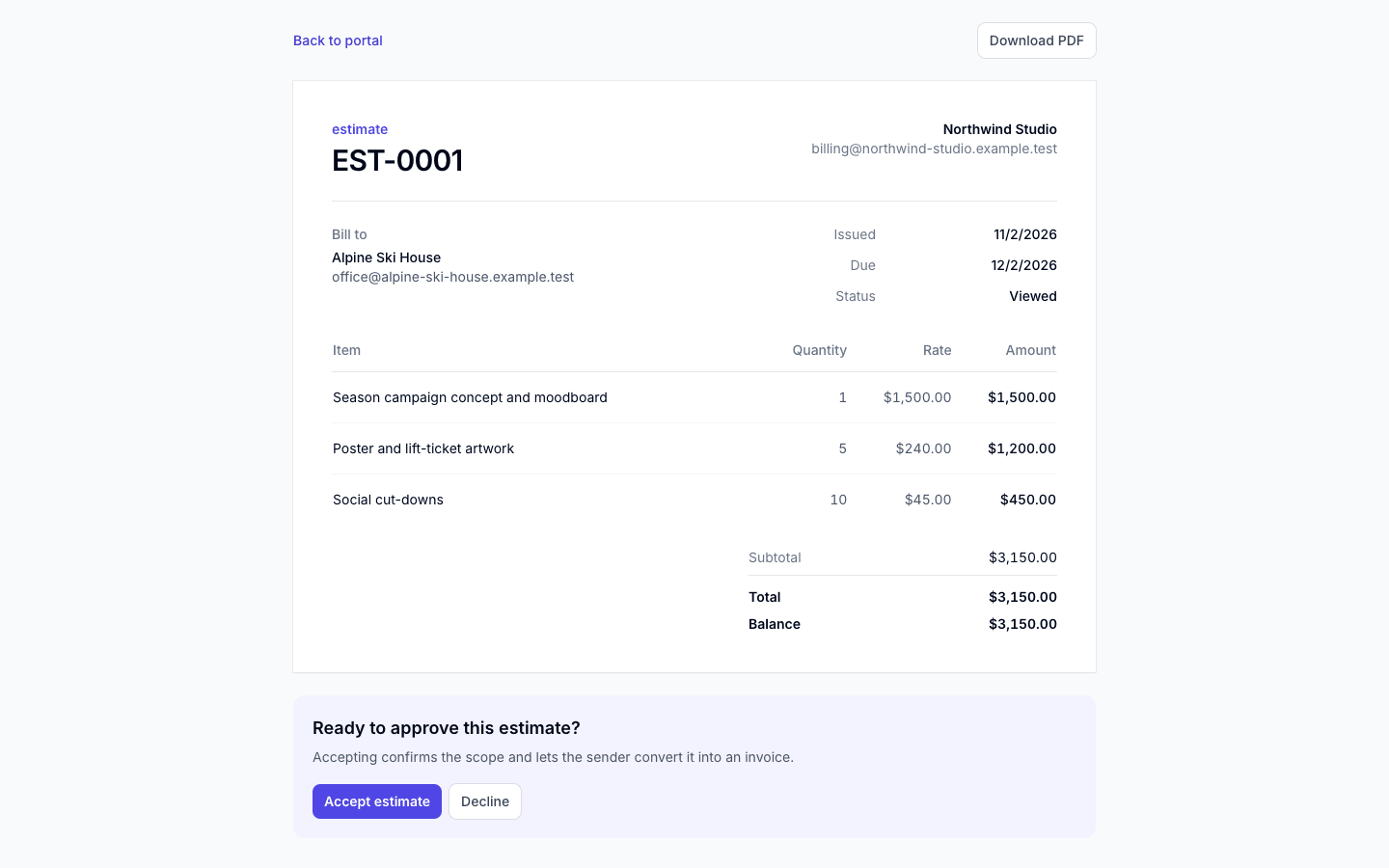
Client portal: estimate EST-0001
Pro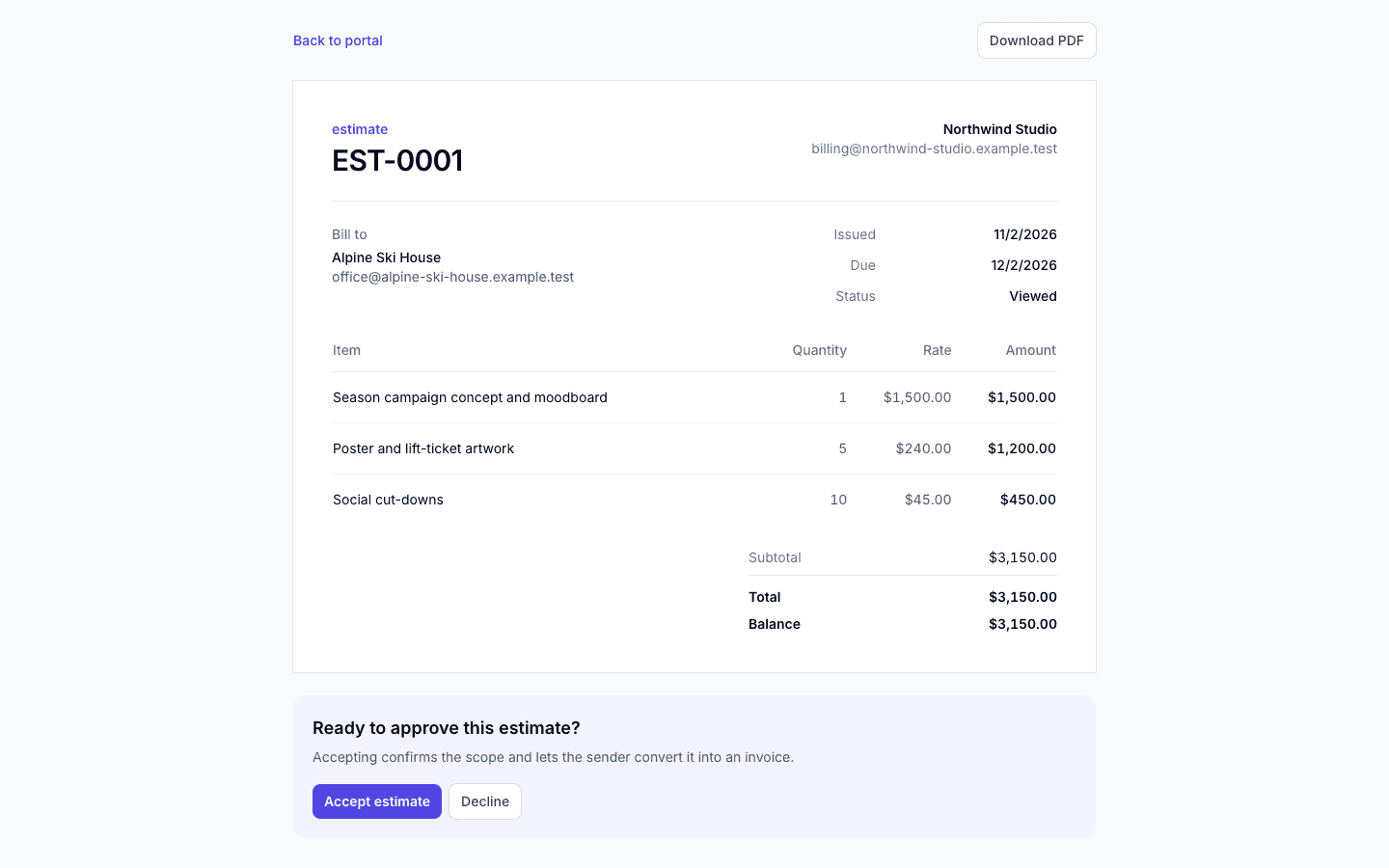
- Client accepts or rejects in a private portal
- One-step conversion to a draft invoice
- Same line items, tax and discount as invoices
- EST- numbering on its own counter
How it works
How do estimates work in InvoiceQuickly?
An estimate is a document type in the same editor you use for invoices. Statuses are draft, sent, viewed, accepted, rejected, converted and cancelled.
Step 1: Create
ProStart a new document and choose "Estimate" instead of "Invoice". Add up to 100 line items (description, quantity, unit price), one discount percentage, one tax percentage, notes and terms. Type it, or describe the job and let the AI drafting tool fill in a draft for you to review.
Step 2: Pick a saved client
ProThis matters: the client accepts the estimate in their portal, and the email only includes a portal link when the estimate is attached to a saved client.
Step 3: Send
ProInvoiceQuickly emails the client a PDF titled "ESTIMATE" with your logo and brand color, plus a link to their private portal. The estimate is numbered with an EST- prefix on its own counter, for example EST-0043.
Step 4: Client decides
ProIn the portal, the client can view and download the estimate and click accept or reject. Opening it marks the estimate as viewed. A client can only decide while it is sent or viewed, and once they decide, the choice is locked.
Step 5: Convert
ProWhen the status shows accepted, choose "Convert to invoice". InvoiceQuickly creates a draft invoice and marks the estimate as converted, so it cannot be invoiced twice by accident.
Step 6: Review and send the invoice
ProAdjust anything that changed during the job, then send it. From here it is a normal invoice: payment links, manual or partial payments, and reminders all apply.
Conversion
What carries over when an estimate becomes an invoice?
Conversion copies the commercial details and resets the dates.
| Estimate field | On the new invoice |
|---|---|
| Client and recipient details | Copied |
| Line items (description, quantity, unit price) | Copied |
| Discount and tax percentages | Copied |
| Notes and terms | Copied |
| Currency | Copied |
| Number | Next number from your invoice counter (INV- unless you changed the prefix) |
| Issue date | The day you convert |
| Due date | The day you convert plus the same number of days that separated the estimate's issue and due dates; if the estimate had no due date, your default payment terms |
| Status | Draft, ready for you to review and send |
Scroll sideways to see every column.
Plan for the due-date rule. There is no separate "valid until" field, and the estimate PDF prints its date as "Due". If you give a quote 14 days of validity, write that in the terms as well, and remember the converted invoice will also get 14-day payment terms unless you change it on the draft.
Worked example
A painting quote from estimate to invoice
A painting contractor quotes a kitchen repaint, with the estimate dated October 27, 2026 and a date 14 days later (November 10). The rates are illustrative and the tax rate is an example only.
Estimate EST-0043
ExampleKitchen repaint client
Dated Oct 27, 2026 · Due Nov 10, 2026
| Item | Amount |
|---|---|
| Labor: prep, prime and two coats · 24 × $55.00 | $1,320.00 |
| Paint and supplies | $380.00 |
- Subtotal
- $1,700.00
- Discount (5%)
- -$85.00
- Tax (8%)
- $129.20
- Total
- $1,744.20
The maths
$1,700.00 × 5% = $85.00 discount (returning client); ($1,700.00 − $85.00) × 8% = $129.20 tax; total $1,615.00 + $129.20 = $1,744.20.
Accepted, then converted
The client accepts EST-0043 in the portal on November 3. The contractor converts it on November 4: the draft invoice (for example INV-0044, from the invoice counter independently of the estimate number) carries the same lines and total, is dated November 4 and is due November 18, 14 days later.
Extra work goes on the draft
If the job needed two extra hours, the contractor adds them to the draft ($110.00 before discount and tax) before sending.
One tax rate per document
Where labor and materials are taxed differently, a single percentage cannot express it. Check your local rules and, if needed, quote materials and labor on separate documents.
A deposit is a recorded payment
There is no deposit step on the estimate. For 30% up front, convert the accepted estimate, send the invoice, and record the $523.26 deposit as a payment when it arrives. The PDF then shows the $1,744.20 total, the payment and $1,220.94 due, and a new payment link charges only that balance. There are no negative lines, so never add a "less deposit" line. The deposit invoicing guide and deposit invoice template cover the wording.
Construction
Is InvoiceQuickly construction estimating software?
No. Construction estimating tools are built around takeoff (measuring quantities from plans), a cost database and bid worksheets. InvoiceQuickly has none of those. It prices the client-facing quote, gets it accepted and invoices it.
| Need | InvoiceQuickly estimates | Construction estimating and takeoff software | Spreadsheet or template |
|---|---|---|---|
| Measure quantities from drawings | No | Yes | No |
| Built-in material and labor cost database | No | Yes | No |
| Markup, overhead and bid closeout | Put it in your unit prices | Yes | Manual formulas |
| Branded PDF quote | Yes, Pro | Usually, as a proposal report | Yes, if you design it |
| Client accepts online | Yes, in the client portal | Varies by product | No |
| Convert to invoice without retyping | Yes, one step | Usually needs a separate invoicing tool | No |
| Track payment against the job | Yes, on the invoice | Varies | No |
| Price | Pro $9/month; not on Free | Typically a separate subscription | Free |
Scroll sideways to see every column.
A common setup for small contractors is to price the job in their estimating or takeoff tool, then enter the client-facing lines in InvoiceQuickly so the quote, approval, invoice and payment live in one place. If you only need a printable quote, the free estimate template or quote template may be all you need.
Plans
Which plan includes estimates?
| Capability | Free | Pro ($9/month) |
|---|---|---|
| Create and send estimates | No | Yes |
| Client accepts or rejects in the portal | No | Yes |
| Convert an accepted estimate to an invoice | No | Yes |
| Branded PDF (logo, color, three styles) | No | Yes |
| Credit notes against invoices | No | Yes |
Scroll sideways to see every column.
Pro also includes unlimited invoices and clients, email delivery, reminders, recurring invoices and 5 team seats. See the pricing page.
Fit
When are InvoiceQuickly estimates the wrong fit?
A good fit when
You quote service work line by line and want the client to approve it online.
You want the approved quote to become the invoice without retyping.
One tax rate and one discount cover the whole job.
Look elsewhere, or pair tools, when
You price jobs from plans. You need takeoff and a cost database.
You need a signed contract. Acceptance is a click in the portal; there is no e-signature, typed name or signature capture.
Clients approve by phone or email and won't open the portal. You cannot mark an estimate accepted yourself, so it cannot be converted. Workaround: duplicate the estimate, switch the copy to an invoice in the editor and send that; the original stays "sent".
You invoice a job in stages. Conversion creates one invoice for the whole estimate. For progress billing, convert and edit the first invoice, then duplicate it for later stages, or start from the progress invoice template.
You need optional line items the client can tick. Every line on the estimate is included in the total.
You need per-line tax rates. One tax percentage applies to the whole document.
If any of these is a must-have, tell us through the contact page. More guides on quoting and estimating are in the estimates resource hub.
Questions
Frequently asked questions
Can I turn an estimate into an invoice?
Yes, on Pro. Once your client accepts the estimate in their portal, choose "Convert to invoice". InvoiceQuickly creates a draft invoice with the same client, line items, tax, discount, notes and terms, dated the day you convert, for you to review and send.
Can I send a fixed-price quote instead of an estimate?
Yes. InvoiceQuickly creates both as an "Estimate" document, so state in the terms whether the price is fixed and how long it is valid. The estimates and quotes hub explains how the two differ and when each one binds you.
Can clients sign estimates electronically?
Not with a signature. Clients accept or reject an estimate with a click in their private portal, and the decision shows as the estimate's status in your dashboard. There is no e-signature or signature capture today.
Are estimates available on the Free plan?
No. Estimates, client acceptance and conversion to invoices are part of Pro at $9/month. Free includes 5 invoices, 5 clients and 3 AI drafts.
How are estimates numbered?
Estimates use an EST- prefix with a four-digit number, for example EST-0043. New estimates, invoices and credit notes use separate counters. Historical gaps remain; existing documents are not renumbered.
Can I take a deposit when the client accepts?
Not automatically. There is no deposit or retainer step on estimates. Convert the accepted estimate, send the invoice, and record the deposit as a payment when it arrives; the PDF shows the payment and the balance due. A Stripe or PayPal link charges the remaining balance, so for a card deposit, send a separate deposit invoice and a final invoice for the rest. InvoiceQuickly has no negative lines.
Send a quote your client can accept online.
Pro at $9/month adds estimates, client acceptance and one-step conversion to invoices.
Start with ProWant to look around first? Try free with 5 invoices and no card.