Online invoice payments on Pro
Accept invoice payments with your own Stripe or PayPal account
Connect the Stripe or PayPal account you already own and add a payment link for an invoice's remaining balance. Your client pays on Stripe's or PayPal's own page, the money goes straight to your account, and InvoiceQuickly records the payment when the provider confirms it.
Payment links are on Pro at $9/month. Every plan, including Free, can record bank transfers, checks, cash and partial payments by hand, so you can try free first.
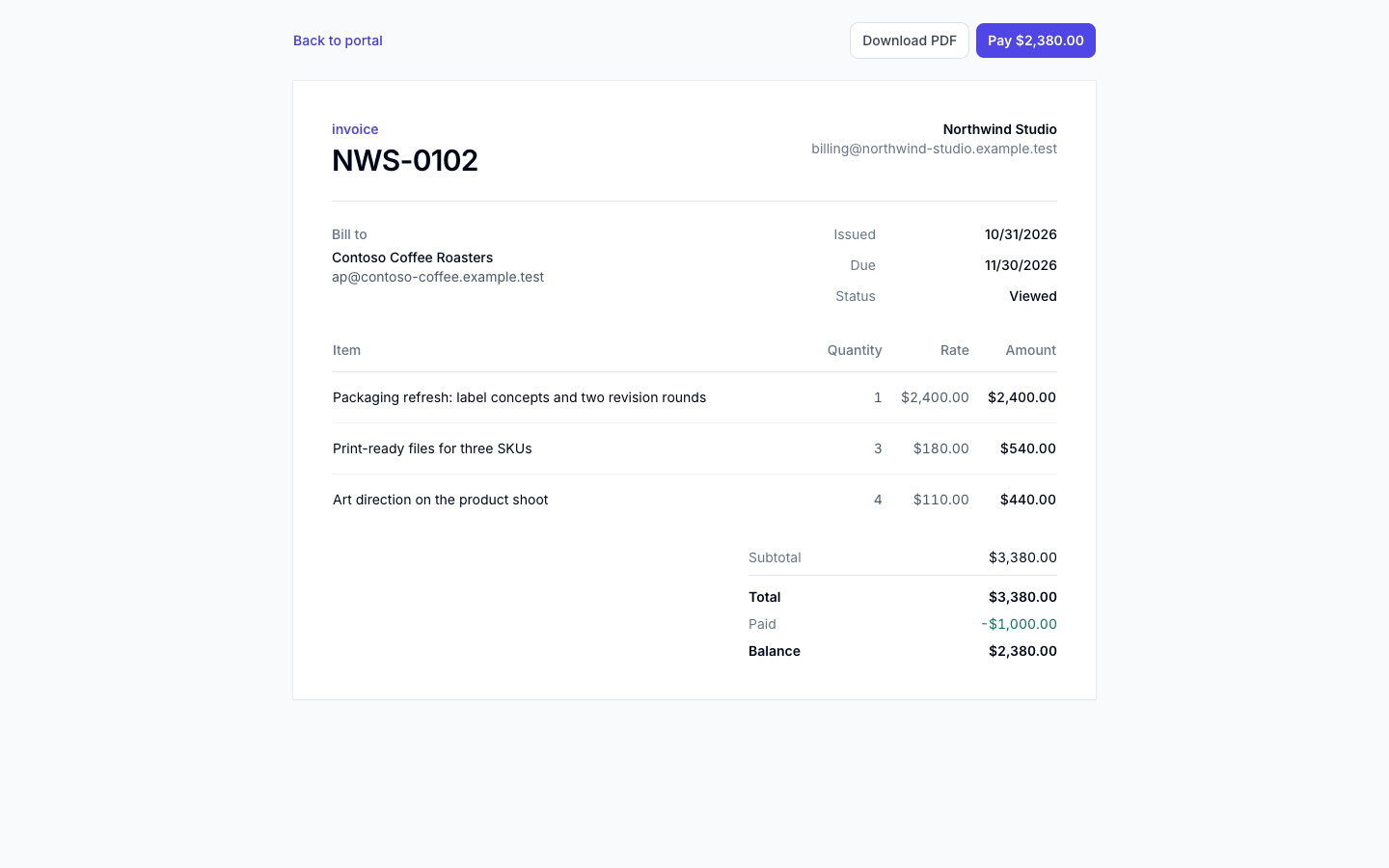
Client portal: invoice NWS-0102
Pro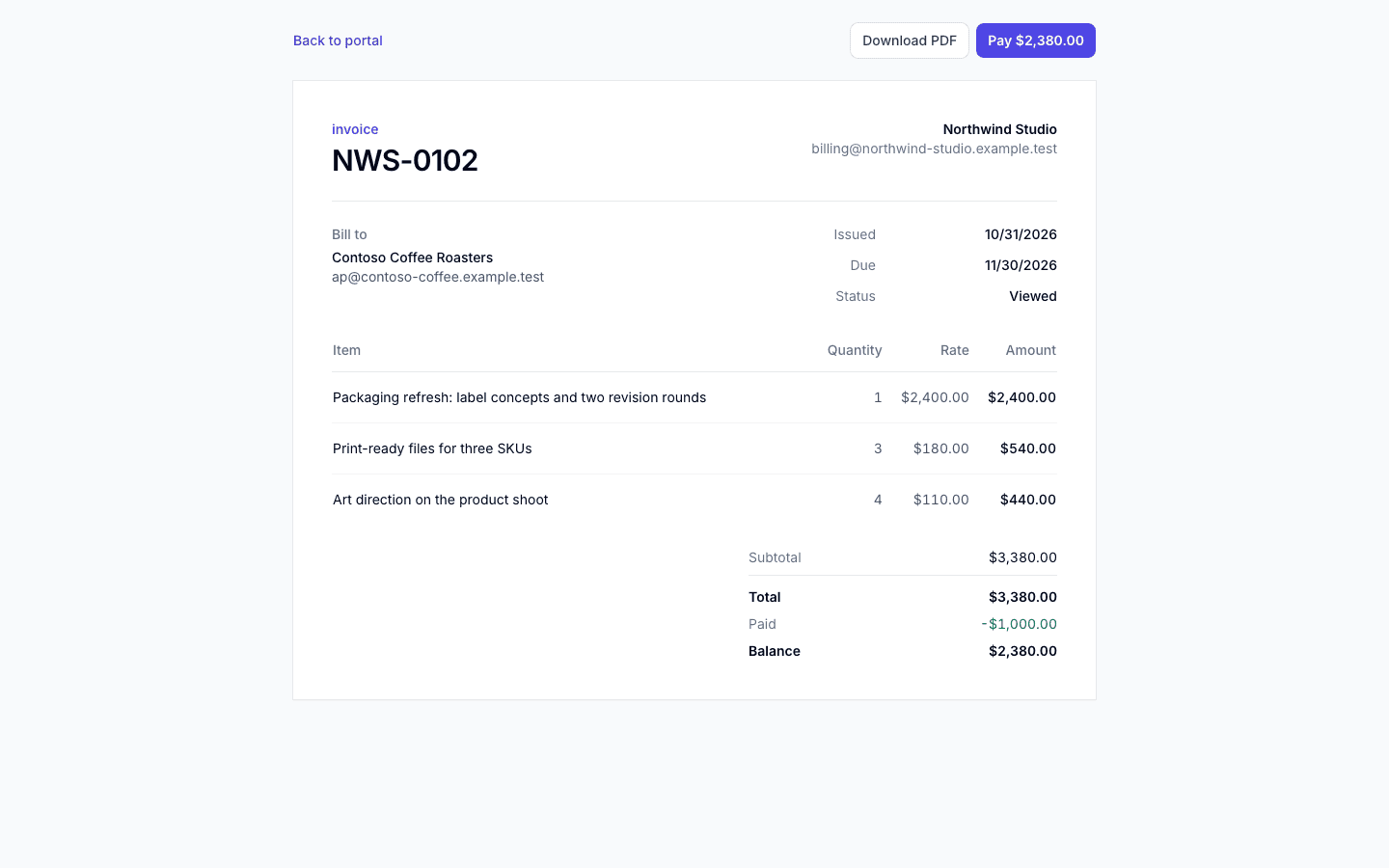
- No per-invoice or per-payment fee from InvoiceQuickly
- Money goes straight to your Stripe or PayPal account
- InvoiceQuickly never sees card numbers
- Manual and partial payments on every plan
How it works
How does a client pay an InvoiceQuickly invoice online?
InvoiceQuickly does not process payments itself. It uses API keys from your own account to create a payment link, and the client pays on a page hosted by Stripe or PayPal.
Step 1: Connect a provider once
ProUnder Integrations, paste your Stripe or PayPal credentials (listed below). They are stored encrypted with AES-256-GCM, and the dashboard only shows the last four characters afterwards.
Step 2: Send the invoice
ProPayment links can be added to any invoice that has left draft and still has a balance, so the usual first step is emailing it.
Step 3: Create the link
ProFrom the invoice's action menu, choose "Create Stripe link" or "Create PayPal link". The link charges the balance outstanding at that moment: total, minus payments recorded, minus any credit notes.
Step 4: Share it
ProThe link appears on the invoice in your dashboard. Your client sees a "Pay" button with the balance when they open the invoice in their private client portal, and the link is included in the email the next time you send the invoice.
Step 5: Get paid
ProStripe or PayPal notifies InvoiceQuickly, which records the payment against the invoice. When the payment covers the full balance, the invoice status changes to paid.
Two details are easy to miss. A link charges a fixed amount: if you record a manual payment or issue a credit note after creating it, create a new link so the amount matches the new balance. A Stripe link expires: a Checkout Session expires 24 hours after creation unless the integration sets a shorter time (Stripe API reference, expires_at), so create a fresh link if a client opens an old one. PayPal links point to a PayPal invoice and do not expire this way.
Setup
What do you need to connect Stripe or PayPal?
An active account with the provider and access to its developer settings. InvoiceQuickly uses your keys. It is not a Stripe Connect platform, so it never holds funds or controls payouts.
| Setup detail | Stripe | PayPal |
|---|---|---|
| Credentials you paste in | Secret key (or restricted key), publishable key, webhook signing secret | REST app Client ID, Client Secret, webhook ID |
| Webhook event to subscribe | checkout.session.completed | INVOICING.INVOICE.PAID |
| What your client sees | A Stripe Checkout page for "Invoice INV-0042" with the balance due | A PayPal invoice page with one line for the balance due |
| Payment methods offered | The ones you have enabled in your Stripe Dashboard | The ones PayPal offers on its invoice page in your region |
| Where the money lands | Your Stripe balance, paid out on your Stripe schedule | Your PayPal balance |
| Refunds from InvoiceQuickly | Executed through the Stripe API (owner or admin role) | Recorded only; issue the refund in PayPal |
Scroll sideways to see every column.
After you save the keys, InvoiceQuickly shows the webhook URL to paste into Stripe or PayPal. Without the webhook, the link still takes payments, but nothing tells InvoiceQuickly that the client paid. More setup detail is on the Stripe payment links and PayPal payment links pages.
Recording
What gets recorded automatically, and what does not?
InvoiceQuickly records a payment automatically after a verified provider success event. Pending payments are not marked paid; transfers outside these links are a manual entry, which every plan can make.
| Situation | Recorded automatically? | What to do |
|---|---|---|
| Client pays a Stripe link by card, and Stripe reports the session as paid | Yes | Nothing |
| Client pays a PayPal link and PayPal sends INVOICING.INVOICE.PAID | Yes | Nothing |
| Client pays through a Stripe method that confirms later, such as a bank debit | After settlement | Subscribe the webhook to checkout.session.async_payment_succeeded; wait for Stripe to confirm success |
| Client sends a bank transfer, check or cash | No | Record it as bank transfer, check, cash or other, with a date and reference |
| Client pays part of the balance by transfer | No | Record the partial amount; the remaining balance updates |
| You refund a Stripe payment | From InvoiceQuickly, yes | Use the refund action (owner or admin) |
| You refund a PayPal payment | No | Refund in PayPal, then record the refund in InvoiceQuickly |
Scroll sideways to see every column.
Delayed bank debits remain pending until Stripe confirms settlement. InvoiceQuickly handles checkout.session.async_payment_succeeded as well as paid checkout.session.completed events. Enable both on your signed endpoint; check the provider record if the invoice has not updated. See Stripe's fulfillment documentation.
There is no "partially paid" status. A partial payment leaves the status as it was and lowers the balance. You cannot record more than the remaining balance, and the invoice flips to paid when the balance reaches zero. The partial payments guide covers how to word terms for split payments.
The invoice PDF shows recorded payments, applied credits and the remaining balance. After a partial payment, download the current PDF or send a fresh payment link for the amount left.
Cost
What does it cost to take an invoice payment?
InvoiceQuickly charges no per-invoice or per-payment fee; payment links are part of Pro at $9/month. The processing fee is set by Stripe or PayPal, deducted from what you receive, and depends on how your client pays.
| How the client pays | Published rate | Fee on $1,200 | You receive | Auto-recorded? |
|---|---|---|---|---|
| Stripe link, US card | 2.9% + 30¢ | $35.10 | $1,164.90 | Yes |
| Stripe link, international card | 2.9% + 1.5% + 30¢ | $53.10 | $1,146.90 | Yes |
| Stripe link, international card needing currency conversion | 2.9% + 1.5% + 1% + 30¢ | $65.10 | $1,134.90 | Yes |
| Stripe link, ACH Direct Debit (if you enable it) | 0.8%, capped at $5 | $5.00 | $1,195.00 | After Stripe confirms settlement |
| PayPal link, card or wallet such as Apple Pay | 2.99% + $0.49 | $36.37 | $1,163.63 | Yes |
| PayPal link, PayPal balance or PayPal Checkout | 3.49% + $0.49 | $42.37 | $1,157.63 | Yes |
| PayPal link, Pay Later | 4.99% + $0.49 | $60.37 | $1,139.63 | Yes |
| Bank transfer outside both providers | Set by your bank | Varies | Varies | No, record by hand |
Scroll sideways to see every column.
Rates are the providers' published US standard pricing as of October 2026: Stripe pricing (accessed 2026-10-27) and PayPal merchant fees, "Invoicing Transaction Rates", last updated October 1, 2026 (accessed 2026-10-27).
Method: fee = invoice total × percentage + fixed fee, rounded to the cent. Business accounts outside the US pay different rates, PayPal adds 1.50% for international invoicing transactions, and both providers can change prices, so check the linked pages before you set your terms.
The invoice shows the gross amount. InvoiceQuickly records the $1,200.00 your client paid, not the $1,164.90 that lands in Stripe; reconcile fees in your Stripe or PayPal reports or your bookkeeping. Small invoices feel the fixed fee more: on a $40 invoice, Stripe's US card fee is $1.46, or 3.65% of the total, because the 30¢ is the same at any size.
Currencies
Which currencies can a payment link charge?
The invoice editor offers seven currencies: USD, EUR, GBP, CAD, AUD, INR and PKR. A payment link charges in the invoice's currency. Whether your Stripe or PayPal account can accept that currency, and whether it converts the money for payout, depends on your account settings and the provider's rules.
InvoiceQuickly does not convert between currencies. Each invoice has one currency, and its totals stay in that currency.
Avoid zero-decimal currencies for payment links, such as the Japanese yen (JPY) or Korean won (KRW). Stripe expects those amounts without decimals, so 500 JPY is sent as 500 (Stripe Docs, "Supported currencies"), while InvoiceQuickly multiplies every amount by 100 before creating the Checkout Session. The charge would be wrong. For those currencies, ask for a bank transfer and record it manually.
Choosing
Stripe or PayPal: which link should you send?
Pick the provider your client is most likely to pay through without friction, then compare cost and bookkeeping. You can connect both and choose per invoice; a longer side-by-side is in Stripe vs PayPal for invoicing.
| Choose | Best for | Main tradeoff |
|---|---|---|
| Stripe | Clients who pay by card the same day; lowest US card rate in the example above | Links expire after 24 hours; bank debits are recorded after confirmed settlement |
| PayPal | Clients who already use PayPal, or who may pay days after receiving the invoice | Higher rate when the client pays from a PayPal balance; refunds are recorded, not executed |
| Manual bank transfer | Large invoices where a 3% fee is real money; zero-decimal currencies | No automatic matching; you record each payment yourself |
Scroll sideways to see every column.
Plans
What can you do on Free and on Pro?
| Capability | Free | Pro ($9/month) |
|---|---|---|
| Record full and partial payments (bank transfer, card, cash, check, other) | Yes | Yes |
| Track remaining balance per invoice | Yes | Yes |
| Connect Stripe or PayPal and create payment links | No | Yes |
| Automatic payment recording from provider webhooks | No | Yes |
| Email the invoice with the payment link and portal link | No | Yes |
| Client portal with a Pay button | No | Yes |
| Execute Stripe refunds from InvoiceQuickly | No | Yes |
Scroll sideways to see every column.
Free allows 5 invoices in total and 5 clients, with no card required. Full plan details are on the pricing page.
Fit
When are InvoiceQuickly payment links the right fit, and when not?
A good fit when
You already have, or can open, a Stripe or PayPal account.
Clients pay each invoice by card or PayPal, and you want the money to land in your own account.
You bill in one of the seven editor currencies, none of which is zero-decimal.
You want payments recorded against the invoice without retyping them.
The wrong tool when
You need to charge a saved card automatically every month. InvoiceQuickly creates one link per invoice and your client pays each one. Card-on-file subscriptions belong in a billing system such as Stripe Billing, which Stripe prices at 0.7% of billing volume on its pay-as-you-go plan (Stripe Billing pricing, accessed 2026-10-27).
You want a deposit taken by card before work starts. There is no deposit field, and a link always charges the whole remaining balance. A deposit paid by transfer can be recorded as a payment on the full invoice; for a card deposit, send a separate deposit invoice. The deposit invoicing guide explains the wording.
You bill in JPY, KRW or another zero-decimal currency. Payment link amounts would be wrong.
You do not have, or cannot open, a Stripe or PayPal account. There is no built-in processing and no other gateway (no Square, Wise, GoCardless or crypto).
You want InvoiceQuickly to hold funds or pay out to you. It never touches the money.
If one of these is a must-have, tell us through the contact page.
Questions
Frequently asked questions
Does InvoiceQuickly charge a fee on payments?
No. InvoiceQuickly adds no per-invoice or per-transaction fee. Payment links are included in Pro at $9/month. Stripe or PayPal deduct their own processing fees from each payment, at the rates on their pricing pages.
Is InvoiceQuickly a payment processor or a Stripe Connect platform?
Neither. You connect your own Stripe or PayPal account with your own API keys. Payments happen on Stripe's or PayPal's hosted pages, money goes straight to your account, and InvoiceQuickly never sees card details or holds funds.
Can clients pay an invoice in installments?
Yes, with a manual step. Record each partial payment by hand on any plan, and the remaining balance updates. On Pro, a new payment link charges whatever balance is left when you create it, so create the link after recording earlier payments.
Why didn't a payment mark my invoice as paid?
The most common reasons are: the webhook was not set up in Stripe or PayPal, the client paid with a delayed method such as a bank debit, the client paid outside the link, or the link was created before a later manual payment changed the balance. Check the payment in your Stripe or PayPal dashboard, then record it manually if needed.
Can I accept payments on the Free plan?
You can record payments your clients make by bank transfer, check, cash, card or other means, including partial payments. Online payment links, automatic recording and email delivery require Pro.
Which card types and wallets can my client use?
Whatever you have enabled in your own Stripe Dashboard, or what PayPal shows on its invoice page. InvoiceQuickly does not choose or restrict payment methods, so check your provider settings before promising a client a specific option.
Put a payment link on your next invoice.
Pro at $9/month adds Stripe and PayPal links, automatic recording and the client portal's Pay button.
Start with ProOr try free first to draft invoices and record payments by hand. 5 invoices, no card.