Project billing and team collaboration: projects, time, milestone invoices and shared access
On Pro ($9/month), set up projects with a client, hourly rate and currency, track time with a timer or manual entries, then select unbilled time and expenses to build one draft invoice you review. An estimate the client accepts in the portal still sets the scope, and milestones and change requests bill as their own invoices. Pro includes 5 seats and Business ($19/month) 10, with owner, admin, member and viewer roles; Business can also import time from Clockify, Toggl Track, Harvest or ClickUp. Tasks and deadlines stay in your project tool.
Free has 1 seat. Pro has 5 seats for $9/month and Business 10 seats for $19/month, in total, not per person. Try free first if you want to look around.
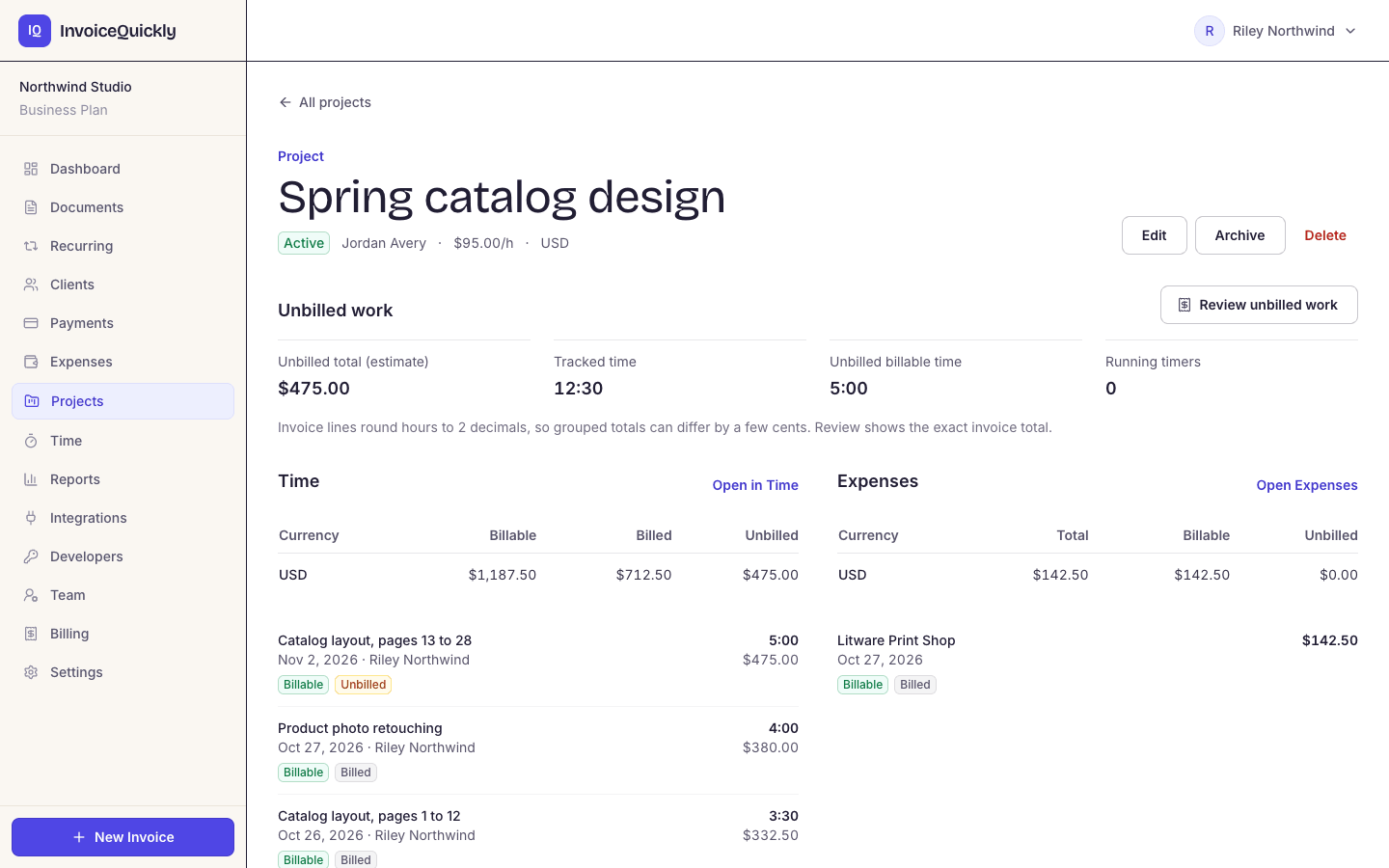
Project: Spring catalog design
Pro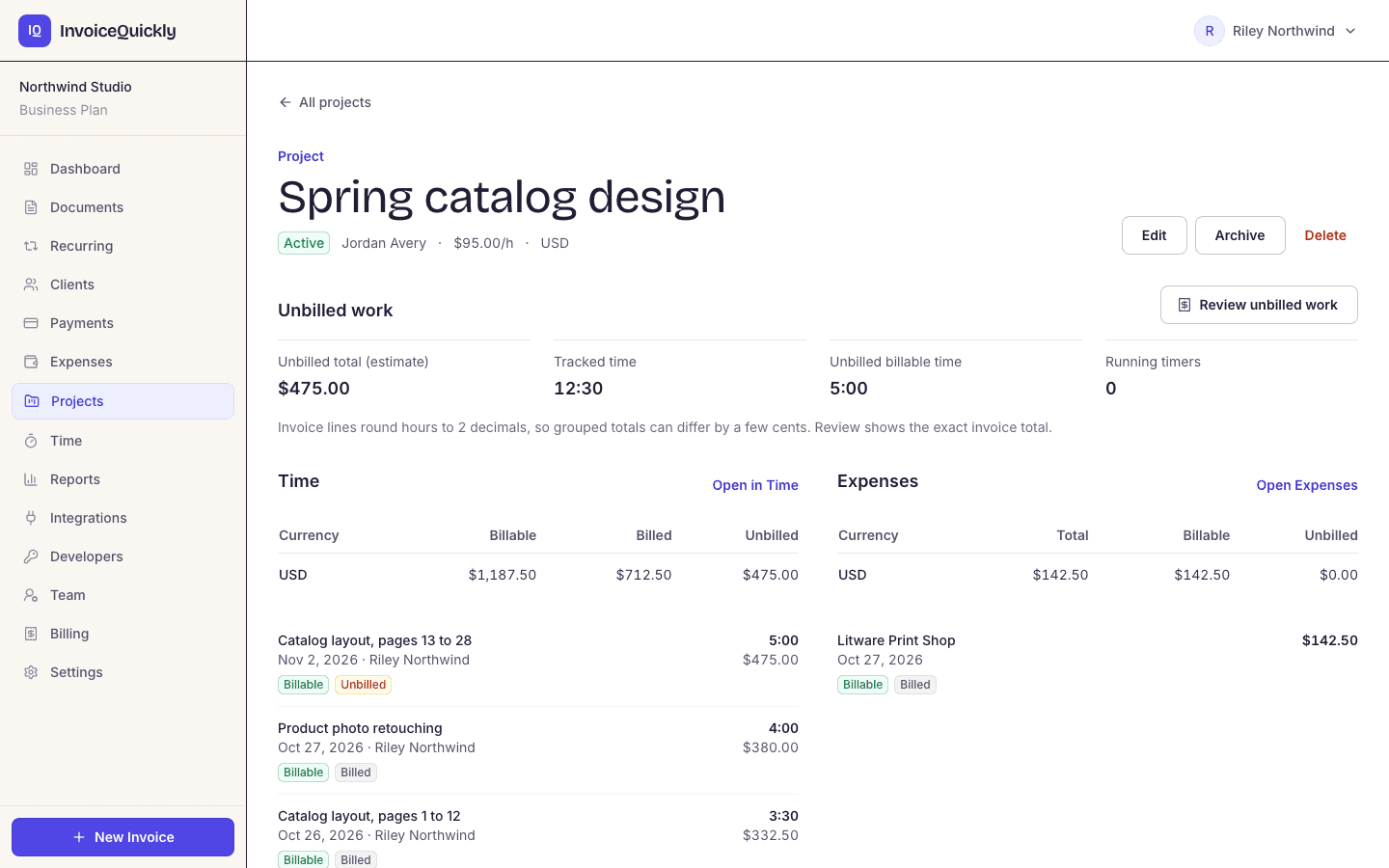
- Pro: projects, a timer and manual time entries
- Unbilled time and costs into one draft invoice
- Pro: 5 seats; Business: 10
- Business: time imports from 4 tools
What you get
What project and team features does InvoiceQuickly include?
Everyone you invite works in the same business account and sees the same clients, projects and invoices, with access controlled by role. Clients collaborate through the Pro client portal: a private link, valid for 90 days, to view and download invoices and receipts and accept or reject estimates.
Projects
Pro- Each project has a client, an hourly rate, a currency, notes and a status: active, completed or archived. A project with billed work can't be deleted.
Time tracking with a timer
Pro- Start a timer or add entries by hand as 1:30, 1.5 or 90m. Each person runs one timer at a time, an entry can be at most 24 hours, and members edit only their own entries.
Bill unbilled work
Pro- Select time and expenses for one client in one currency, and InvoiceQuickly creates one draft invoice, a line per entry or grouped by project and description. The billed rate is recorded, so later rate changes don't reprice it.
Team seats with roles
Free: 1 · Pro: 5 · Business: 10- Owner, admin, member and viewer. Pro's 5 seats cost $9 a month in total and Business's 10 cost $19 (see plans).
Email invitations
All plans- They expire after 7 days if not accepted. Pending invitations count toward your seats.
Estimates the client accepts
Pro- Send an estimate with a portal link. The client accepts or rejects it, and an accepted estimate converts to a draft invoice with the same lines.
A history for each client
Pro- A client's portal lists every invoice, estimate and credit note you've sent them, with payment receipts and the balance still outstanding.
Notes on every client
All plans- Keep contacts, PO rules or how a client wants milestones billed on the client record, where the whole team can see them.
A protected invoice record
All plans- Only drafts can be edited. Once an invoice is sent, a correction means a credit note (Pro) or cancelling and reissuing it, so nobody can quietly change an invoice the client already has.
There are no tasks, deadlines, invoice comments or enforced approval step. A simple habit covers review: members save drafts, and an owner or admin checks and sends them. Business imports selected time entries from Clockify, Toggl Track, Harvest and ClickUp; see every integration.
Roles
Who on your team can do what?
| Action | Owner | Admin | Member | Viewer |
|---|---|---|---|---|
| View invoices, estimates and clients | Yes | Yes | Yes | Yes |
| Create, edit and send invoices and estimates | Yes | Yes | Yes | No |
| Add and edit clients, create client portal links | Yes | Yes | Yes | No |
| Draft invoices with AI or voice | Yes | Yes | Yes | No |
| Create projects, track time, record expenses (Pro) | Yes | Yes | Yes | No |
| Bill unbilled time and expenses into a draft (Pro) | Yes | Yes | Yes | No |
| Change business settings and reminder settings | Yes | Yes | No | No |
| Invite and manage team members | Yes | Yes | No | No |
| Connect Stripe or PayPal, create API keys | Yes | Yes | No | No |
| Connect QuickBooks Online, Xero and time imports (Business) | Yes | Yes | No | No |
| Issue refunds | Yes | Yes | No | No |
| Manage the InvoiceQuickly subscription | Yes | No | No | No |
Scroll sideways to see every column.
Members edit only their own time entries. Give a bookkeeper the viewer role: they can see invoices and clients but can't create or change anything. The viewer uses one of your seats.
What you can do now
How do you bill project work with InvoiceQuickly?
Use the estimate as the project's agreed scope, invoice in stages against it, and track change-request hours against the project. Worked example: a three-person studio (an owner, an operations lead as admin and a designer as member, on one Pro account) bills a fixed $6,000 website rebuild, 40% at kickoff, 40% at design sign-off and 20% at launch, with change requests at $90 an hour.
Step 1: Estimate the scope
ProThe operations lead sends estimate EST-0007 for $6,000 and the client accepts it in the portal. Converting an accepted estimate creates one invoice for the full amount, so for milestone billing, keep the estimate as the record of scope and invoice each stage yourself.
Step 2: Invoice each milestone
All plansThe designer drafts each milestone invoice with a line such as "Website rebuild, milestone 1 of 3 (40% of EST-0007)". 40% of $6,000 is $2,400; the final 20% is $1,200.
Step 3: Bill change requests
ProThe designer tracks change-request time against the project at its $90 hourly rate. On the Unbilled page, 7.5 hours becomes a $675 line in one draft invoice, which the operations lead reviews and sends.
Step 4: Keep a project ledger
One spreadsheet row per invoice for the fixed-fee milestones. Invoices have no project field, so only invoices built from tracked time or expenses appear when you filter Reports by project.
Because every invoice line names the project and the estimate number, anyone on the team can match an invoice to its project from the PDF or the CSV export (Pro) without asking. For more on splitting work across invoices, see how to invoice multiple projects for one client.
The ledger
The studio's project ledger
| Invoice | What it bills | Amount | Status |
|---|---|---|---|
| EST-0007 | Agreed scope | 6,000.00 | accepted |
| INV-0051 | Milestone 1 (40%) | 2,400.00 | paid |
| INV-0058 | Milestone 2 (40%) | 2,400.00 | sent |
| INV-0060 | Change requests, 7.5 h | 675.00 | sent |
| Invoiced to date | 5,475.00 | ||
| Fixed fee still to bill | Milestone 3 | 1,200.00 |
Scroll sideways to see every column.
Pairing tools
Which tools pair well with InvoiceQuickly for project work?
Keep each job in the tool that does it best, and decide in advance how information moves between them. Projects and hours can live in InvoiceQuickly on Pro; tasks and deadlines stay in your project tool, and that handoff is a person.
| Job | Where it lives | Handoff to InvoiceQuickly |
|---|---|---|
| Scope and price | InvoiceQuickly estimate (Pro) | Client accepts in the portal |
| Tasks and deadlines | Your project management tool | Milestone reached → someone drafts the invoice |
| Hours worked | InvoiceQuickly time tracking (Pro), or Clockify, Toggl Track, Harvest or ClickUp | Timer or manual entries; Business previews and imports selected entries from those four tools |
| Project budget and profit | A spreadsheet or accounting software | Invoiced, spent and tracked figures from Reports (Pro) |
| Getting paid | InvoiceQuickly, with Stripe or PayPal links on Pro | Payments recorded automatically or by hand |
Scroll sideways to see every column.
A simple rule that prevents missed billing: at each weekly team meeting, compare the project ledger with your project tool's finished milestones. Any milestone marked done with no invoice number beside it gets drafted that day.
Fit
Is InvoiceQuickly the right fit for your team?
A good fit when
A team of up to 5 on Pro, or 10 on Business, shares one invoicing account and bills fixed fees, milestones or tracked hours.
You want billing and settings in the owner's and admins' hands, and read-only access for a bookkeeper.
Use other software when
You need tasks, deadlines or resource planning. InvoiceQuickly tracks projects and time for billing, not the work itself; keep a project management tool.
You need project profitability. Reports show what you invoiced, spent and tracked by project, not a profit figure after labour costs and overheads. See expense tracking and invoice and payment reports for the limits.
Your team is bigger than 10. Pro has 5 seats and Business 10, and one account holds one business.
Someone must approve every invoice. There is no enforced approval step.
You need SSO or two-factor sign-in for compliance. Neither is available.
Not sure it fits? Tell us how your team works: how many people, how you track time, and where invoices get stuck.
Questions
Frequently asked questions
Does InvoiceQuickly have project management?
Not task management. On Pro, a project holds a client, hourly rate, currency and status, and time and expenses are tracked against it for billing. Tasks, deadlines and budgets stay in your project tool, and Business can import time from Clockify, Toggl Track, Harvest or ClickUp.
How many users can share an InvoiceQuickly account?
Free has 1 seat, Pro has 5 seats for $9 a month in total, and Business has 10 seats for $19 a month, all with owner, admin, member and viewer roles.
Can a team member see all invoices?
Yes. Everyone in the account can view all invoices, estimates, clients and projects. Members can also create and send invoices and track their own time; viewers can only look.
Can I give my bookkeeper access?
Yes, as a viewer. A viewer can see invoices and clients but can't create or change anything. The viewer uses one of your seats.
Can I track time in InvoiceQuickly?
Yes, on Pro and Business. Start a timer or add entries by hand, up to 24 hours each, against a client and project. Select unbilled entries on the Unbilled page and they become lines on one draft invoice you review, so 7.5 hours at $90 becomes a $675 line.
Bill your next project milestone as a team.
Pro at $9/month adds 5 seats, projects, time tracking, estimates and the client portal; Business at $19/month adds 10 seats and time imports.
Start with ProOr try free first with one seat and 5 invoices.